Stage 1 / 6
Build the mental model
Understand Migrate API, its plugin families and the tools that turn migration work into a controlled process.

A Drupal migration is not merely an import command. It is a controlled transfer of information between two models that rarely agree on names, formats, identifiers or relationships. The technical work matters, but so do the questions that precede it: what must move, what can be discarded, how will the destination represent it, and how will we prove that the result is correct?
The Migrate API gives that transfer a structure we can reason about. Drupal separates reading the source, transforming each value and writing the result into destination entities. Around that pipeline sit dependencies, mapping tables, messages, repeatable execution and rollback: the less visible machinery that turns a one-off script into an observable process.
This guide is a map for learning that machinery progressively. It expands the ideas behind the Drupal migration series and connects them with some practical articles about resources, how to manage embedded and CSV data, Google Sheets, debugging and multiple remote APIs. You can read it from beginning to end or use the final route selector to enter at the problem you need to solve today. Happy Hacking!
Table of Contents
1. Why migrations matter in a Drupal project
2. Think in migrations, ETL and pipelines
3. Design the transfer before executing it
4. Build a toolbox, but learn through cases
5. Debug from evidence, not intuition
6. Follow the Drupal migration learning path
7. Choose your entry point
8. Reminder
9. :wq!
This guide has a deliberate sequence, but real migration work rarely arrives in a convenient order. You may be learning the fundamentals, planning a delivery, diagnosing a failure or already orchestrating several remote systems. Use the selector below to choose the most useful entry point for the situation you have today.
Whichever route you choose, the same model keeps the journey coherent: understand the source, make every transformation explicit and keep the destination observable. The ETL diagram below gives us that shared vocabulary before we move into Drupal-specific decisions.
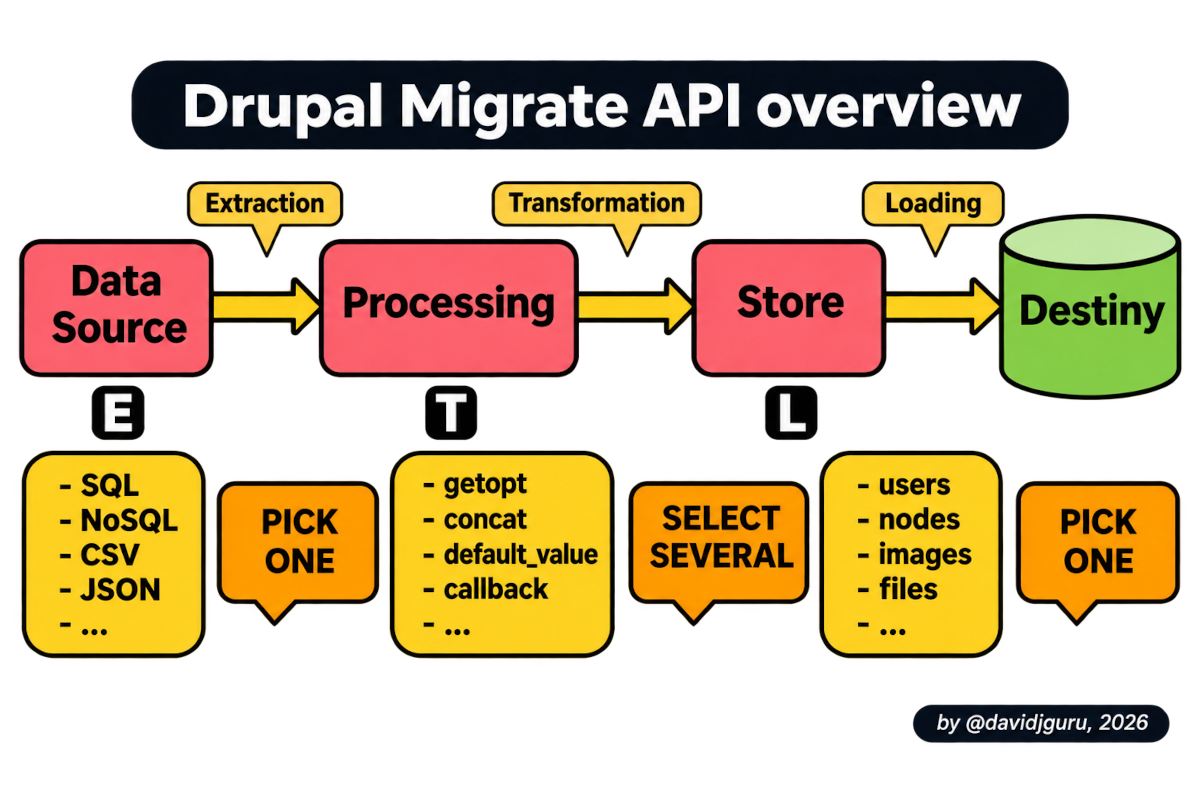 ETL provides the mental model behind a Drupal migration pipeline.
Existing data often decides whether a new Drupal platform is viable. A proposal may have a sound content model, a capable editorial interface and a convincing technical architecture, yet it remains incomplete until somebody answers a deceptively simple question: What happens to the information already supporting the organization? Migration knowledge lets us answer with something more credible than “we will write a script later”.
A migration is therefore both a technical process and a project capability. Moving from a legacy CMS, an older Drupal version, a spreadsheet or a collection of remote services requires analysis, design, implementation and validation. It may involve developers, content specialists, project owners and people who understand the source data well enough to explain its exceptions. Treating the work as a final import task hides that shared responsibility.
The original migration articles behind this guide present migration expertise as something that benefits the practitioner, the project, and the organization at the same time. That idea remains relevant beyond Drupal 8: a team that can inventory information, model transformations, and explain a reversible execution plan is better equipped to justify its architectural decisions and reduce uncertainty throughout delivery.
At its broadest, a migration moves software information from an origin to a destination while resolving their differences. That’s all. That’s the essence of an ETL process (Extract, Transform, Load)…
The source might be a relational database, CSV files, JSON responses, a Google Sheet, another Drupal installation or even another application built using different technologies.
The destination might contain nodes, taxonomy terms, users, files, media, paragraphs, configuration or custom content entities.
The process between them lies the real work: deciding what every source value means in the new model.
ETL gives us a durable vocabulary for that work: Extract, Transform and Load. Extraction obtains rows from the source; transformation cleans, combines, normalizes or derives values; loading persists the result in its destination. This is not Drupal-specific terminology, and that is precisely why it is useful: it lets us discuss the information flow before choosing modules, commands or individual plugins.
Drupal translates ETL into source, process and destination plugins. A migration normally selects one source plugin to produce rows, chains one or more process plugins for each destination property, and uses one destination plugin to create or update the final object. The output of one process step can become the input of the next, so the transformation layer behaves as a pipeline rather than as a flat list of assignments.
Paraphrasing the original training article, the basic model is definition plus (+) execution, while the expanded model adds pipeline behavior, migration groups and dependencies. The YAML definition describes intent, but the runtime state tells us what was imported, which source identifiers correspond to destination identifiers, what failed and whether a later migration can safely reuse an earlier result.
Finally, we could also say that the basic model essentially boils down to three steps: definition + execution + debugging
A reliable migration begins with an inventory, not with YAML. List the source datasets, stable identifiers, relationships, languages, files and exceptional records. Then describe the destination entities, bundles, fields and validation rules. This comparison exposes gaps early: a source column may have no destination, a required Drupal field may have no source value, or a relationship may depend on content that must be migrated first.
The destination model should drive the transformation strategy. A title may map directly, but dates may need parsing, term names may require entity lookup, files may need a separate migration, and embedded structures may have to become paragraphs or custom entities. Designing these operations as explicit transformations makes them reviewable and prevents business rules from disappearing inside an improvised importer.
Dependencies turn a collection of imports into an ordered migration plan. Users, files or taxonomy terms often need to exist before nodes can reference them; parent records may need to precede children; remote identifiers must remain traceable after loading. Migration groups and lookup plugins express those relationships, while map and message tables provide the operational memory needed for incremental execution and diagnosis.
Code versus configuration is a design decision, not merely a difference in file location. Both approaches may use YAML, but they have different lifecycles, deployment implications and editing workflows. The important question is which model makes the migration repeatable, reviewable and safe for the team operating it. The second article in the series compares these approaches through embedded-data and CSV examples rather than treating the choice as an abstract preference.
Before implementation begins, it is worth turning that design work into questions the whole team can answer. This short checklist makes hidden assumptions visible while they are still inexpensive to discuss.
When those six answers are explicit, YAML becomes the expression of an agreed model rather than a place where the model is invented by accident. We can now move from planning into the practical toolbox and progressively more realistic cases.
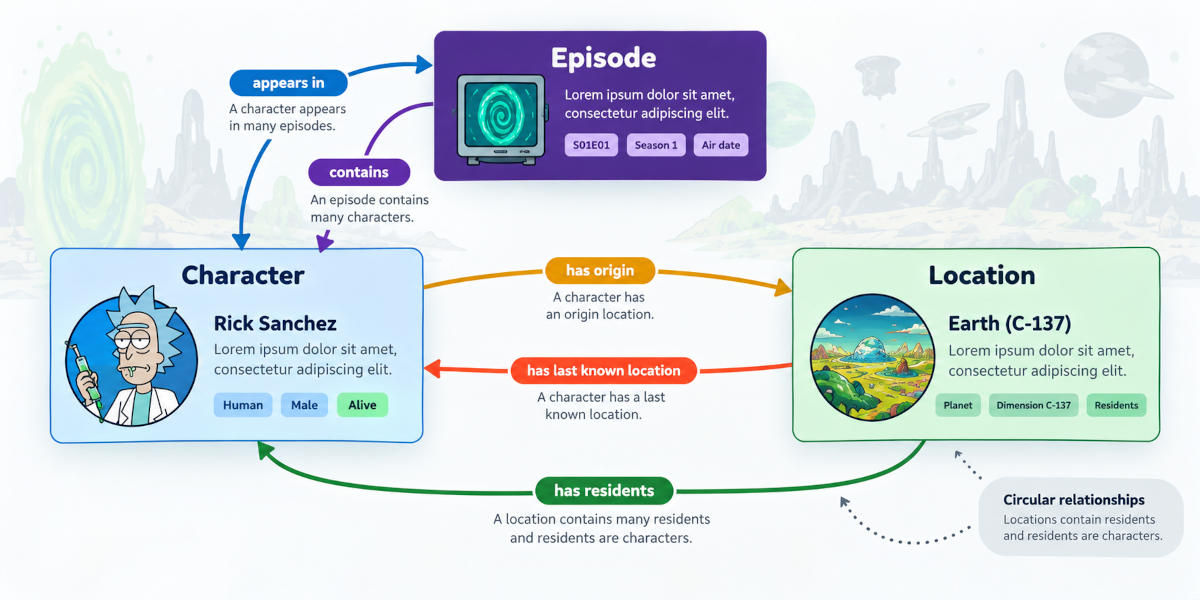 A migration becomes more than field mapping when several sources and entity relationships meet.
Drupal core provides the migration framework; contributed modules make it practical to operate. Migrate supplies the base API and plugin system, while tools commonly used around it add definitions, commands, source formats or debugging support. Module names and compatibility can change between Drupal versions, so the first article explains the landscape and points toward resources that should be checked for the version used by a real project.
A toolbox becomes useful only when each tool is connected to a problem. Source plugins answer “How do I read this?”, process plugins answer “How do I turn it into the value Drupal expects?”, and destination plugins answer “What kind of object am I writing?”. Drush commands then expose status, import, rollback and message workflows. Keeping those responsibilities separate makes it easier to replace one part without rewriting the entire migration.
The learning path deliberately grows from controlled examples toward realistic integrations. Embedded rows as base scenario remove external uncertainty; CSV introduces a file source; Google Sheets adds a remote transformation; debugging articles expose runtime state; and the multi-API project combines entities, relationships and enrichment. This progressive, iterative and incremental route comes directly from the educational strategy in the working draft: each case should reuse the previous mental model while adding one meaningful source of complexity.
Most migration failures are easier to solve when we reduce the search space. Start by checking the source data and the migration definition: identifiers, field names, plugin configuration, destination properties and assumptions about formats. Then inspect status, map tables and migration messages. These layers often reveal whether the problem occurred while reading, transforming or loading a row.
The symptom you can observe is often enough to choose the first useful debugging layer. Select the closest description below to avoid reaching for breakpoints before the data, definition, maps and messages have had a chance to explain the problem.
The recommendation is a starting point, not a substitute for reducing the case. Once you have chosen a route, run the smallest representative subset and follow one row through the pipeline.
The next level is to observe the values moving through the pipeline. Debugging helpers and process plugins can expose source and destination properties at a controlled point, while running a small subset keeps the signal readable. This is more useful than repeatedly importing an entire dataset because it ties an unexpected result to a particular row and transformation step.
Xdebug is the final level when configuration and runtime evidence are not enough. Breakpoints let us follow plugin discovery, row preparation, process execution and destination handling inside PHP. The related article describes debugging as a ladder—data and definitions, database state and feedback, then code—which is the organizing principle used by the fourth and fifth articles in this guide.
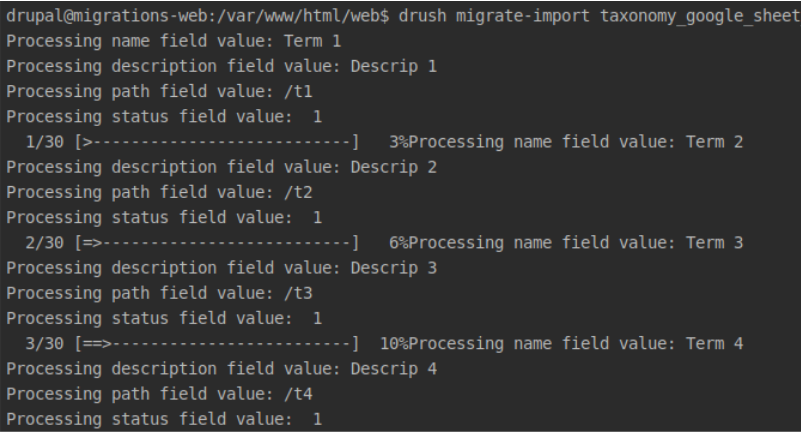 Migration feedback connects a source row, its transformed values and the destination result.
Six articles, six levels of confidence and one route you can enter at any point. Explore the path below from foundations to integration architecture, or jump directly to the stage that matches the problem in front of you. Every stop tells you what you will be able to do next—not merely what you will read.
Choose your next move
Select a stage to preview the capability you will build. The route is sequential, but your current problem gets to choose the starting point.
Stage 1 / 6
Understand Migrate API, its plugin families and the tools that turn migration work into a controlled process.
Stage 2 / 6
Move from concepts to working embedded-data and CSV migrations, including execution and rollback.
Stage 3 / 6
Follow Google Sheets data into Drupal and see how source formats reshape values before Migrate receives them.
Stage 4 / 6
Use definitions, map tables, messages and Migrate Devel to locate the exact stage where a result diverges.
Stage 5 / 6
Connect Xdebug, DDEV and PhpStorm so breakpoints can reveal plugin discovery, processing and destination handling.
Stage 6 / 6
Treat migration as integration architecture by combining remote sources, custom entities and traceable relationships.
Tip: use the arrow keys to move through the route.
If you are learning, follow the sequence from concepts to complexity. Begin with resources, reproduce the embedded-data example, introduce CSV, and only then move to remote sources. That order keeps each new problem identifiable: first the mechanics, then source variability, then debugging, and finally relationships across multiple APIs.
If you are already responsible for a failing migration, enter through the debugging route. Start with the fourth article, reduce the run to a small and reproducible case, and move to Xdebug only after checking definition, data, maps and messages. Return to the examples whenever you need to isolate a particular source or process pattern.
If you are designing a real project, use this page as a checklist of conversations. Ask what must move, which identifiers are stable, how entities relate, what can be rolled back, how the team will validate results and which version-specific assumptions need confirmation. The examples span different moments in Drupal’s evolution; the durable lesson is the method, while commands and module compatibility must always be checked against the target platform.
A good migration leaves more than imported content behind. It gives the team an explicit model of the source, a reviewable set of transformations and enough evidence to explain how every important record reached Drupal. That shared understanding is what turns migration code into project knowledge.
The safest route is progressive, repeatable and observable. Start with a small dataset, preserve stable identifiers, validate relationships and add complexity only after the previous step can be imported, inspected and rolled back. All the articles and resources in this guide are different rehearsals of that same discipline.
The next useful step is the one you can verify. Choose the article closest to your current problem, reproduce its smallest working case and return to this map whenever the source or destination model becomes unclear. A migration becomes manageable when its decisions stop being implicit.
At this point, reading more is less valuable than choosing one action that produces evidence. The final selector offers two deliberately different exits: establish the foundations or take an existing failure into a structured debugging workflow.
Both routes lead back to the same discipline: make the work observable, repeatable and reversible. Choose the one that matches your current risk, then return to this hub when the next layer of complexity appears.
Subscribe to receive new articles about Drupal and web development directly in your inbox.
Comments
Comments are provided by Disqus. They are loaded only if you allow the comments category in your cookie preferences.