Drupal Migrations (VI): The Rick and Migraty experience, merging data from different sources

In previous articles in this series, I have been exploring the Drupal Migrate API from different angles: first as a toolbox, then through simple embedded data and CSV examples, later with a Google Spreadsheet exposed as JSON, and finally by taking a step back to debug the process when reality starts to bite. Because it always bites.
This sixth installment returns to the practical side of data migration: populating Drupal with remote, structured data retrieved from multiple APIs. The goal is not to build the most spectacular migration in the world in a single sitting, but rather to design a migration process that is simple enough to understand and complex enough to be genuinely useful.
What does this show about Drupal? It can bring data from several APIs into a structured content model, preserve the relationships between records, and turn that model into pages people can browse and search. For developers building directories, catalogues or other sites that combine external data, The Rick and Migraty experience provides a practical example using Migrate API, custom content entities and Views. The linked repository and DDEV setup let you run the project locally and inspect how those pieces fit together.
To achieve this, we will connect to external, open, and freely accessible APIs. Resources such as the Rick and Morty API, the TVmaze API, and the Rick and Morty Fandom Wiki will provide the data we need to populate our Drupal entities with characters, locations, episodes, ratings, and descriptions.
The Rick and Morty API will serve as our primary data source, providing the core entities and their relationships. TVmaze will join the party as a secondary enrichment source, supplying episode ratings that we can merge into our existing Drupal entities. Finally, Fandom will contribute narrative descriptions, biographical details, and other contextual information, helping us build richer profiles of the characters and locations from our favourite animated universe.
Note: As of October 14, 2026 this article contains over 52,000 characters and around 10,000 words, with an estimated reading time of 50–60 minutes.
Picture from Unsplash, user Julian Kraus, @juliankraus
Table of Contents
0. TL;DR (I just wanna play with some Drupal stuff)
1. Where the idea came from (origins)
2. What we’re looking for (goals)
3. Analyzing the data (understanding)
4. Some initial constraints (wait)
5. Destination containers in Drupal (entities)
6. Designing the migration (cooking)
7. Defining migration plugins (solutions)
8. More info from the source (enrichment)
9. From data to content (browsing)
10. The migration as an operation (running)
11. Losing your mind (debugging)
12. Things worth highlighting (deciding)
13. What I learned (reflecting)
14. Next steps (planning)
15. :wq!
0. TL;DR (I just wanna play with some Drupal stuff)
Okay, okay, I’m not judging you. So, make sure you meet the project prerequisites:
- Have Git installed on your machine (git v2.43.0).
- Have DDEV installed on your machine (ddev v1.25.4, Docker v29.9.0).
- Have access to a Linux terminal on your machine.
Once you’ve checked all that, follow these steps:
git clone https://gitlab.com/davidjguru/rick-and-migraty.git
cd rick-and-migraty/
ddev start
ddev composer install
This will have configured the project in your local development environment (LDE) using DDEV. Now, let’s set up the Drupal installation:
ddev drush site:install --existing-config \
  --account-name=admin \
  --account-pass=admin \
  -y
ddev launch
This will complete the website setup and finally launch the project in your web browser, using https://rick-and-migraty.ddev.site:
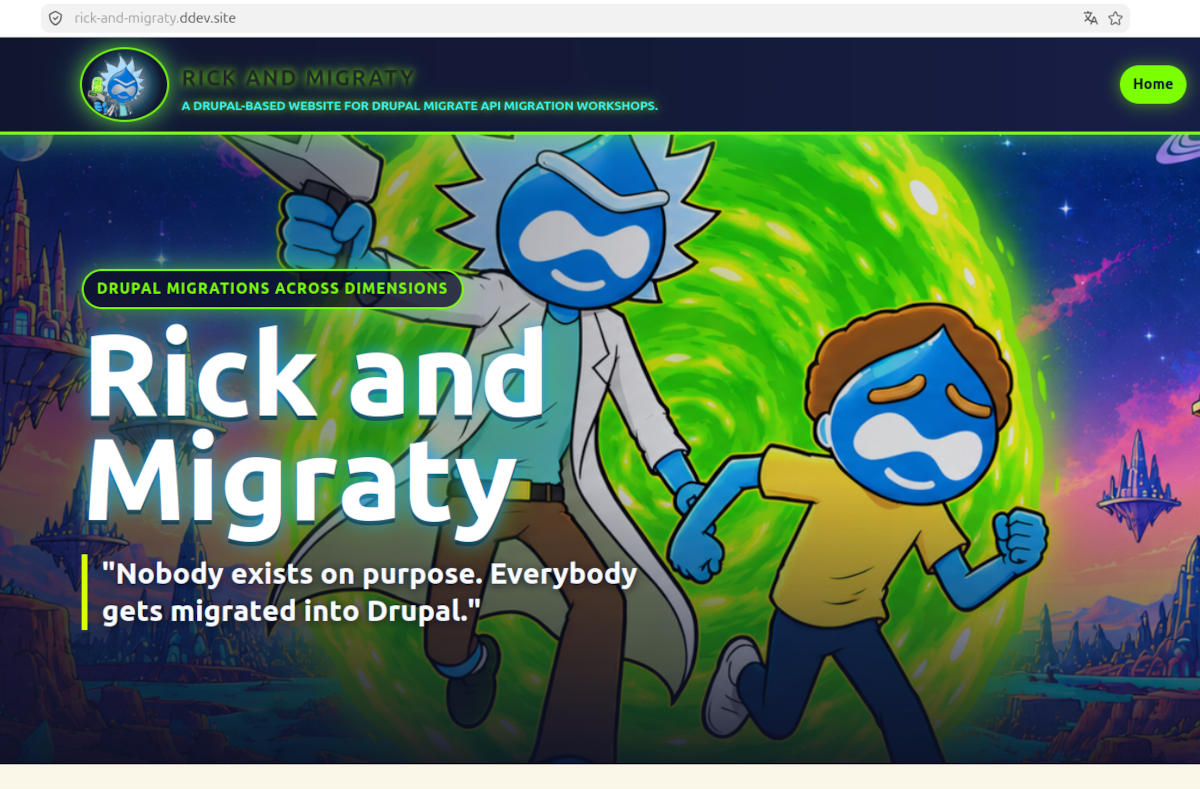 Main view of Rick and Migraty in your browser
On the homepage, what really matters are the actions the project lets you perform:
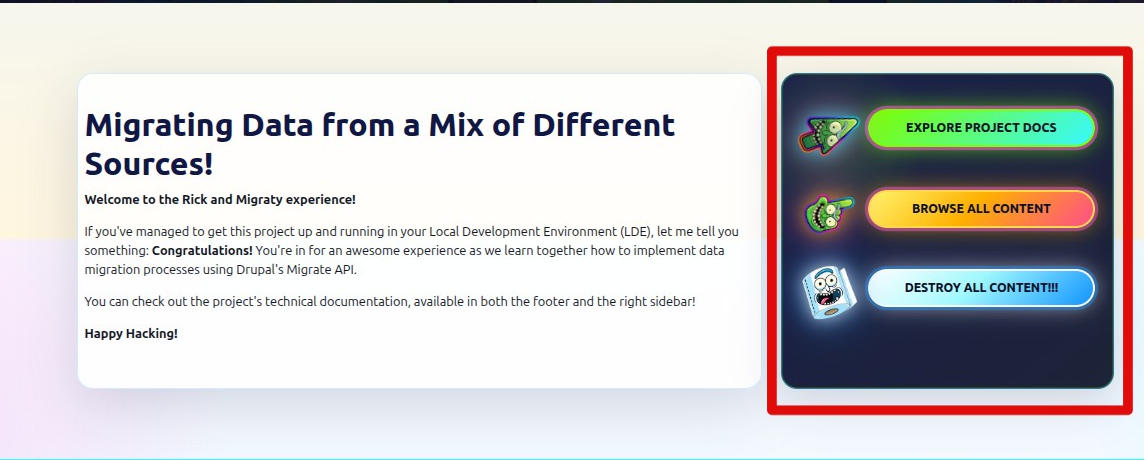 Website action menu: Learn, explore, delete stuff!
Remember! The installation credentials are user: admin, password: admin, and you can also access the project documentation at the local URL https://docs.rick-and-migraty.ddev.site. Enjoy!
Like what you’re seeing? Give me a little support by sharing this article, spreading the word about the project repository (https://gitlab.com/davidjguru/rick-and-migraty), or giving it a star on GitLab:
 Support me by giving the project a star! ⭐
1. Where the idea came from (origins)
For a while, I was working on Drupal migration processes built around the Migrate API. Some of those professional experiences eventually found their way into the series of articles on Drupal migrations published here.
Around the same time, the Adult Swim animated series Rick and Morty (2013–present) came into my life. For a while, it was one of my favorite shows (despite its ups and downs), thanks to its breakneck pace, complete lack of filters, vibrant colors, and the eccentric relationship between a mad scientist (Rick Sanchez) and his grandson (Morty Smith).
I wanted to do something with all of this, brewing up a magic potion with a little bit of Drupal, a whole lot of Rick and Morty, and a generous dose of Drupal’s Migrate API. For some time, I had been playing around with the idea of bringing together useful information about the show in a web platform designed to index its enormous number of characters (a number that seems to grow exponentially). So I decided to give it a shot… and that’s how I discovered The Rick and Morty API, which got me pretty excited about the whole thing.
And that’s how The Rick and Migraty Experience was born.
 Main image for the new Rick and Migraty experience: Wubba Lubba Dub-Dub!
Recent events have given me a bit more time on my hands, allowing me to refocus on the idea and finally pick up right where I left off. Luckily, I had kept all the work I had already done: UX research, mockups, wireframes, Drupal entity designs for the data, and use cases for queries. Lots and lots of queries, all ready to receive lots of JSON responses.
The third article of this series already used a JSON-shaped source, but it did it through a Google Spreadsheet transformation and a contrib parser that knew how to deal with that special structure. This time I wanted to move the focus to a more API-shaped scenario.
The Rick and Morty API is a useful playground for Drupal migrations because it is public, stable (enough) for an article, paginated, relational, and a little bit ridiculous in the right way. That combination is more valuable than it looks. A migration example should not only import three flat rows and call it a day; it should expose some of the structural problems we face in real projects.
In this case, the goal is to design the migration process before writing all the code. We will identify the source resources, propose a Drupal destination model, define the order of operations, and list the process plugins or transformations that will probably be needed.
2. What we’re looking for (goals)
The main idea, the key objective, is to build a unified platform where we can explore and keep track of both the different characters populating the show’s episodes and the episodes themselves. A place where we can browse character profiles like this one:
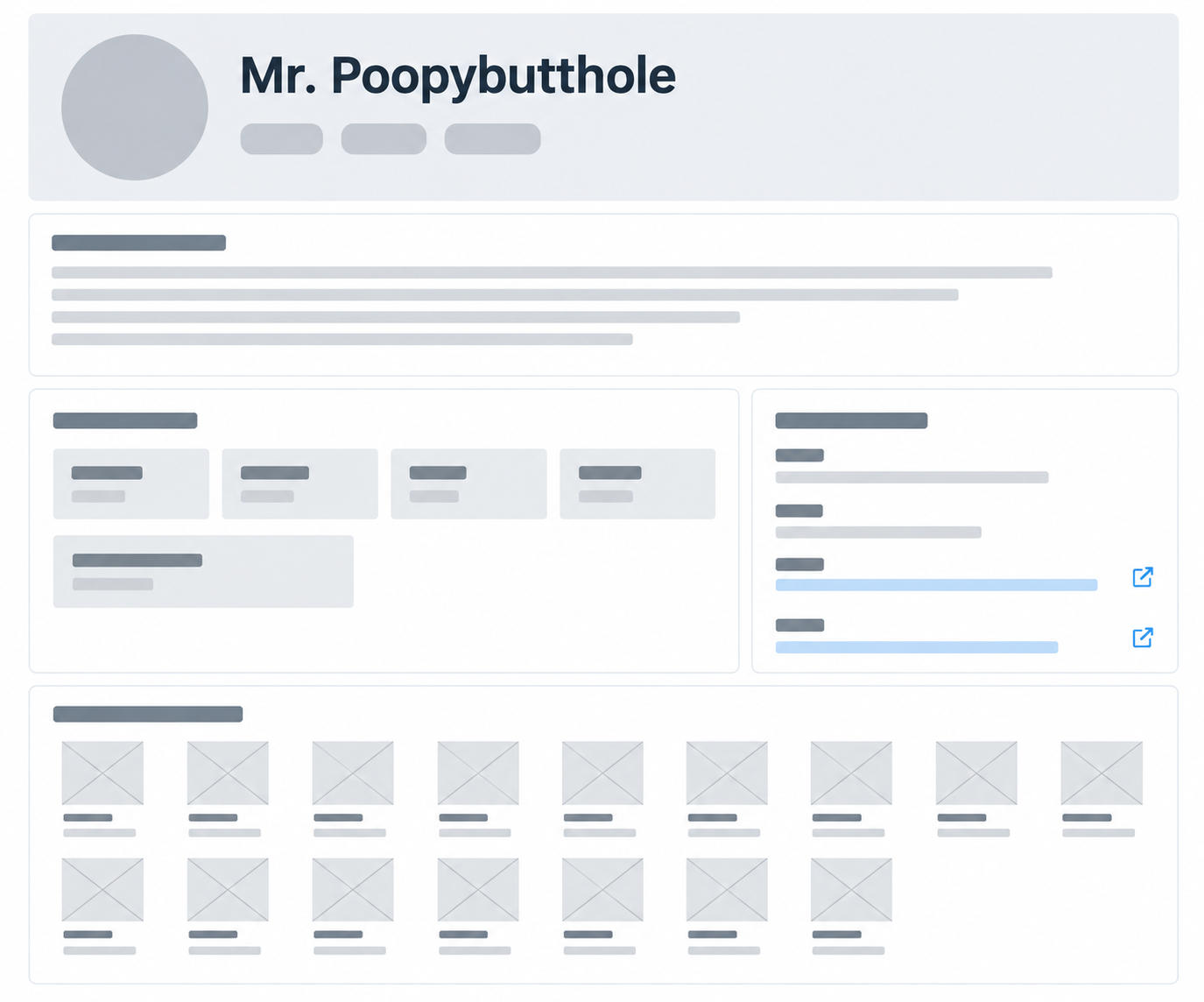 Low-fidelity wireframe of a character profile
A website that serves as a valuable resource for looking up information about the roughly one thousand existing characters (the numbers vary depending on the source, as many characters inhabit different locations and there isn’t always a clear consensus), along with the show’s many episodes and seasons. All wrapped up in a consistent, simple, and visually appealing look and feel. Turning the original sketches and wireframes into something a little more exciting:
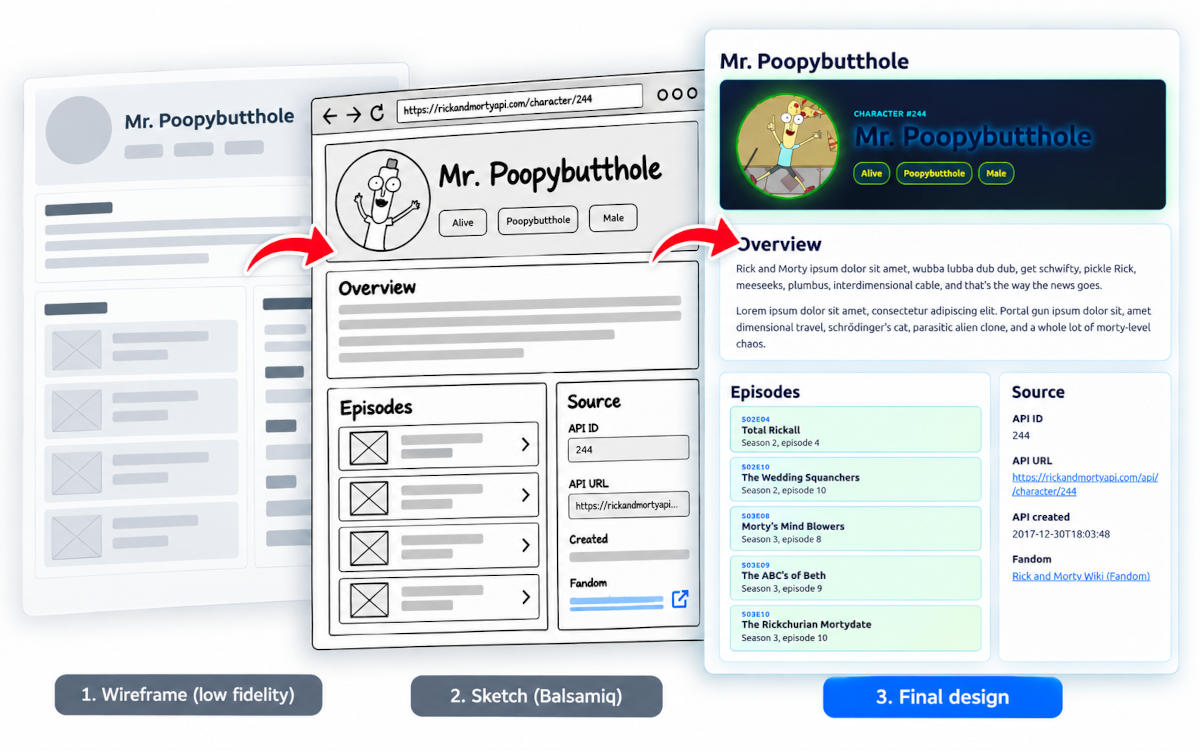 The UX evolution of a character profile, from wireframe to mockup and design
On a more granular, specific level, we need a basic, straightforward, intuitive navigation system. A small, easy-to-use search tool to find and filter information, and, alongside the data platform itself, a centralized space to gather project-related documentation and know-how. But since platforms like this already exist, we need to take things a step further: bringing together information that currently cannot be found in a single place.
To achieve this, we’ll design a migration process capable of merging data from multiple sources if necessary. But before writing migration YAML files, we need to fully understand the nature of the problem —or rather, the technological challenge— we’re trying to solve.
3. Analyzing the data (understanding)
The first thing we need to think about is how to model what we’re looking for: what information we want to retrieve, what kind of innovation we want to bring to the process (to create something distinctive, as we discussed earlier), and how we’re going to achieve it.
The first question is: What would we consider valuable information? Let me list a few ideas:
- Having a synopsis for each episode, providing some context about what happens in it.
- Getting a rating or score for each episode.
- Having a list of the characters appearing in each episode.
- Having some background information about characters, whether biographical or related to their role in the story.
- Browse a list of episodes in which a particular character appears.
This is where a brief data source selection phase begins. For obvious reasons (since it was part of the original motivation behind this project), we want our primary data source to be The Rick and Morty API. However, considering the requirements we’ve outlined above, this API has some limitations:
- Episodes don’t include a synopsis or description.
- Episodes don’t include a rating or score.
- Characters don’t include a description.
This API will be the canonical source for the core domain. That means it decides which characters, locations and episodes exist in our Drupal model. Other APIs can enrich the imported records, but they should not silently change the main identity of the dataset. However, as you can see from the original data source itself ( https://rickandmortyapi.com/documentation#get-a-single-episode), we’re still missing some information to complete our model:
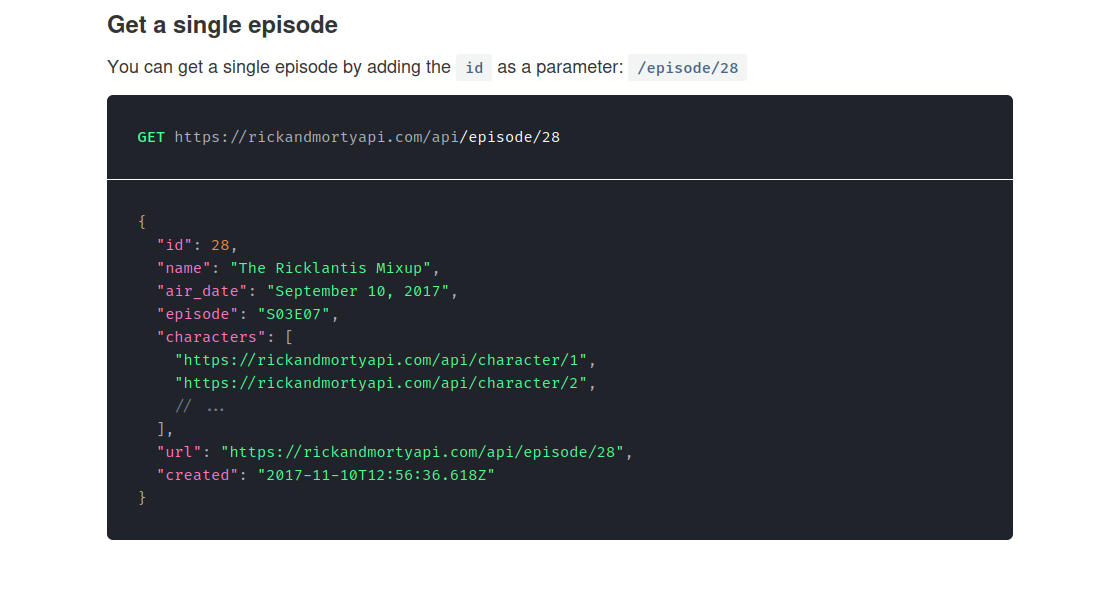 Example of a data block retrieved from an episode
So, we need additional data sources to provide the missing information and enrich our existing data: descriptions (for both episodes and characters) and ratings (for episodes).
To retrieve character biographies and episode synopses, we can use the Fandom Wiki API, which can provide us with this information.
And what about ratings per episode? Fandom may provide a field called ratings, but these aren’t ratings in the sense of episode scores or reviews. On the Rick and Morty Wiki/Fandom episode pages, this field appears to represent audience figures (viewership in millions), rather than a numerical rating.
So, we need an additional data source to retrieve these episode ratings. For this, we’ll use the TVmaze API (TVmaze is a community-driven database and tracking platform for television series and web shows).
This is not only “read JSON and create Drupal content". That sentence is always too small. In this case we are modelling a small content domain from remote APIs data: characters, places, episodes, ratings, descriptions, references between records, and the operational rules that make repeated imports predictable.
So, to sum things up… At this point the project is already working with three API surfaces while modelling the content and the migration:
| API | Role in the migration |
|---|---|
https://rickandmortyapi.com/api | Canonical source for characters, locations and episodes. Its root endpoint exposes the three main collections: character, location and episode. |
https://rickandmorty.fandom.com/api.php | Wiki/MediaWiki surface for editorial context that does not belong to the canonical entity identity. This source needs an explicit contract before we let it write into Drupal fields. |
https://www.tvmaze.com/api | TV metadata API used as a secondary enrichment source for episode ratings and traceability through the TVmaze show and episode endpoints. |
That separation matters. When more than one API participates in the same destination model, each source needs a clear responsibility. Otherwise the migration becomes a quiet argument between remote systems, and Drupal is left holding the broom.
The three main resources provided by the Rick and Morty API should map naturally to Drupal content-like entities:
- Characters: Are the most visible records in the dataset. They carry status, species, gender, origin, last known location, avatar URL and references to episodes. They are also the records most readers will expect to browse first.
- Locations: Provide the spatial structure of the multiverse: planets, clusters, dimensions and other places. They are not just labels attached to characters; they are entities with their own metadata and reverse relationships through residents.
- Episodes: Provide the narrative structure. They connect many characters, have season and episode codes, and are the best place to merge TVmaze ratings because both APIs can agree on season and episode number.
For this article, I want to treat them as real structured domain data rather than as disposable sample JSON. That means we will not simply import characters as nodes and ignore everything else. In fact the interesting part is the relationship graph:
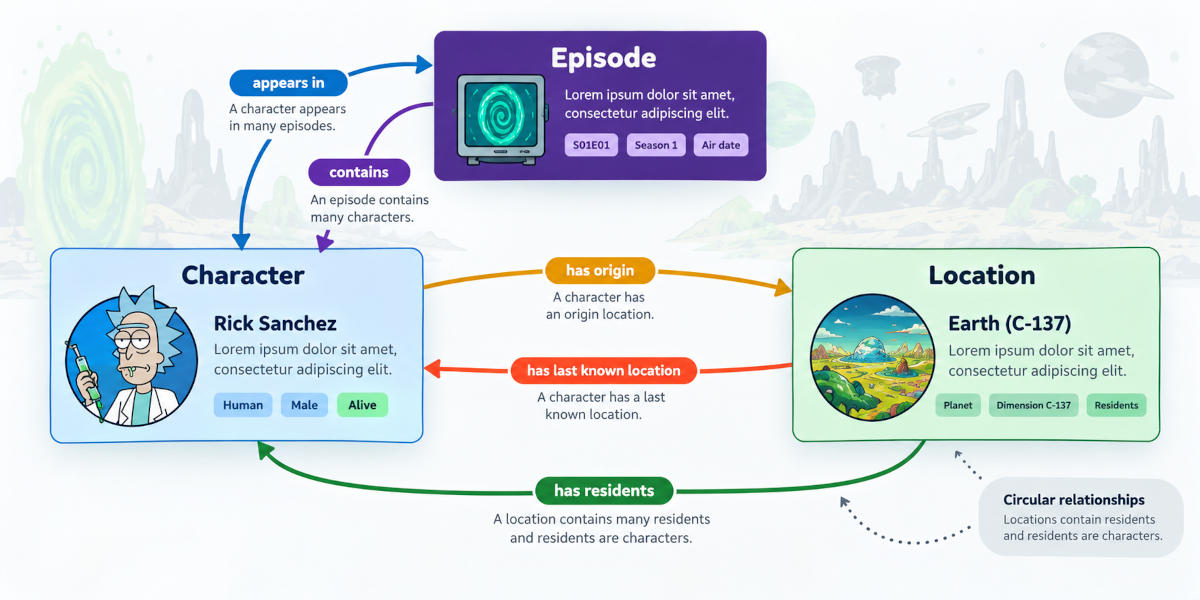 Diagram of relationships between concepts/entities in the migration process
As you can see in the image above:
- Characters have an origin and a last known location.
- Characters appear in episodes.
- Episodes contain many characters.
- Locations contain residents.
- Residents are characters.
And yes, this means we have circular relationships.
4. Some initial constraints (wait)
Those circular relationships are the first architectural constraint. They tell us that the migration cannot be one single heroic import. So, let’s get our thoughts organized.
The first constraint is migration order. Locations and episodes
need to exist before characters can reference them. Characters need to exist
before episodes can fill their characters field and locations can fill their
residents field. The import order is not a technical afterthought; it is part
of the content model.
The second constraint is source authority. Rick and Morty API records carry
stable numeric IDs and resource URLs, so those values should become our external
identity layer through fields such as api_id and api_url. TVmaze can enrich
episodes, but it should not create extra Drupal episodes that the canonical
source did not expose. Fandom can provide wiki-shaped editorial context, but it
must not casually overwrite the canonical source either. Before it enters a
destination field, we need to decide whether that field is source identity,
editorial enrichment, display helper data, or only diagnostic metadata.
The third constraint is repeatability. During development we will run imports many times, rollback, reset, limit pages, cache responses and sometimes use fixtures. The scenario is therefore not only a modelling exercise. It is also an operations exercise: can we run the migration again tomorrow without guessing what state the database, the map tables or the remote API are in?
Welcome to migrations. The data is a complete mess, but at least it comes in JSON.
5. Destination containers in Drupal (entities)
My first instinct here is to avoid nodes. Not because nodes are bad, but because this data is imported, structured, external, and strongly relational. It feels more honest to model it as custom content entities.
In the project this will be a dedicated entity API custom module: rick_and_migraty_api
Its job is not to fetch remote data. Its job is to provide the permanent Drupal model that the migration layer can fill and that the site can later expose through routes, Views, templates and navigation. The module will define three custom content entities:
- rick_and_migraty_character
- rick_and_migraty_location
- rick_and_migraty_episode
All three extend the same abstract base class:
Drupal\rick_and_migraty_api\Entity\RickAndMigratyEntityBase
That base class centralizes the fields that every imported API resource needs:
api_id, name, api_url, api_created, uid, created, changed and
path. The important one is api_id: it is required, constrained as unique,
and represents the stable numeric identifier from the Rick and Morty API. In
practice, that makes it the external identity we can use for updates,
relationship lookups and debugging.
The name field is also the Drupal entity label through entity_keys, while
api_url and api_created keep the imported entity traceable to the original
remote resource. The local created and changed fields tell us when Drupal
created or updated its copy. The uid field exists because these are real
content entities and Drupal still needs an owner for access checks and edit
forms.
The base entity also keeps enrichment fields for a later Fandom pass:
fandom_description, fandom_page_id, fandom_url and fandom_source. That
is deliberate. The canonical entity identity comes from the Rick and Morty API,
but editorial context can arrive later from the Wiki/Fandom API as a separate
update operation. The model makes that distinction visible instead of pretending
every imported field has the same authority.
Finally, each entity includes a path base field. That gives Pathauto a place
to store readable aliases while the internal entity canonical routes remain
stable.
The three entity types also must share the same administrative shape: they expose canonical, collection, add, edit and delete routes, use a custom list builder for administrative overviews, expose Views data, and are protected by a single permission:
administer rick and migraty api entities
One small but important implementation detail: view access is public, while administrative operations remain protected. That matches the goal of the module: the imported universe should be browsable, but managing imported records still belongs behind Drupal permissions.
Locations
Fields for rick_and_migraty_location:
| Field | Type | Notes |
|---|---|---|
location_type | string | Maps the API type property without using the ambiguous field name type. |
dimension | string | Stored as text because dimensions are not a separate normalized API resource. |
residents | entity reference, multiple | References rick_and_migraty_character. Filled after characters exist. |
Locations are imported early because characters refer to them through origin
and location.url. The reverse residents relation can wait for a later pass.
That avoids asking the migration to reference characters that have not been
created yet.
Episodes
Fields for rick_and_migraty_episode:
| Field | Type | Notes |
|---|---|---|
air_date_raw | string | Preserves the human-readable API value, such as December 2, 2013. |
air_date | datetime date | Optional normalized date for sorting and filtering when parsing is reliable. |
episode_code | string | Stores codes such as S01E01. |
season | integer | Derived from episode_code. |
episode_number | integer | Derived from episode_code. |
tvmaze_id | integer | TVmaze episode ID used for rating traceability. |
tvmaze_url | uri | Canonical TVmaze episode URL. |
rating_average | decimal | Average episode rating imported from TVmaze, stored with one decimal place. |
rating_source | string | Provider label for the rating. The expected value is TVmaze. |
characters | entity reference, multiple | References rick_and_migraty_character. Filled after characters exist. |
Episodes are where the project starts to move beyond the Rick and Morty API. The API gives us the episode identity, title, code and character URLs. TVmaze enriches that same episode with rating data. That is why the entity stores both the canonical Rick and Morty API fields and the TVmaze traceability fields.
The episode_code field is intentionally preserved as source text and split
into season and episode_number. Those derived integer fields are more useful
for filtering, sorting, matching TVmaze episodes and building navigation.
Characters
Fields for rick_and_migraty_character:
| Field | Type | Notes |
|---|---|---|
status | list_string | Allowed values: Alive, Dead, unknown. |
species | string | Free text because the API exposes open-ended values. |
character_type | string | Maps the API type property without using the ambiguous field name type. |
gender | list_string | Allowed values: Female, Male, Genderless, unknown. |
origin | entity reference | References rick_and_migraty_location. Resolved from origin.url when available. |
last_location | entity reference | References rick_and_migraty_location. Resolved from location.url when available. |
image_url | uri | Keeps the remote avatar URL for traceability. |
avatar | image | Downloaded local avatar image, stored under public://rick-and-migraty/characters. |
episodes | entity reference, multiple | References rick_and_migraty_episode. |
Characters are the most connected entity in the model. They point to locations,
they point to episodes, and they also appear in reverse lists on locations and
episodes. For that reason, the character migration should not be the first one
to run. It needs locations and episodes to exist before origin,
last_location and episodes can be resolved safely.
The remote image_url and the local avatar field are intentionally separate.
The URL preserves the API payload. The image field represents a Drupal-managed
file that can be rendered consistently on character pages.
This leaves the module with a graph that mirrors the source API without forcing everything into a single import pass:
rick_and_migraty_character.originpoints torick_and_migraty_locationrick_and_migraty_character.last_locationpoints torick_and_migraty_locationrick_and_migraty_character.episodespoints torick_and_migraty_episoderick_and_migraty_episode.characterspoints back torick_and_migraty_characterrick_and_migraty_location.residentspoints back torick_and_migraty_character
And because these are custom content entities, they can participate naturally in Views, entity routes, templates and permissions without pretending to be normal editorial nodes. Take a look at the custom entities implemented for this project here in the repository.
The project also defines readable Pathauto patterns for the imported entities:
| Entity type | Alias pattern |
|---|---|
| Character | /rick-and-migraty/characters/[rick_and_migraty_character:name] |
| Location | /rick-and-migraty/locations/[rick_and_migraty_location:name] |
| Episode | /rick-and-migraty/episodes/[rick_and_migraty_episode:name] |
Those aliases are intentionally plural and reader-friendly. Underneath, the
entity canonical routes are still stable Drupal routes such as
/rick-and-migraty/character/{rick_and_migraty_character}. That separation lets
the implementation stay predictable while the public URLs remain pleasant.
6. Designing the migration (cooking)
Once we have the destination model figured out (or almost), the next step is not to start writing YAML files as fast as possible. The next step is to cook up the migration design: understand how the source data is organized, decide the import order, determine which problems we can solve with YAML and which ones require custom plugins, and only then start connecting source, process, and destination.
We should also be aware that new difficulties and challenges will inevitably arise along the way. We’ll need to iterate, experiment, and find solutions through trial and error. Be patient.
To get our cooking started, let’s consider that the Rick and Morty API is a REST API that returns JSON. It is not JSON:API in the strict sense of the Drupal core module, but from a migration perspective, the fundamental idea is the same: we receive structured records from a remote source and transform them into Drupal entities.
The API uses GET requests over HTTPS and returns JSON responses. List endpoints are paginated and include an info object containing pagination metadata:
{
  "info": {
    "count": 826,
    "pages": 42,
    "next": "https://rickandmortyapi.com/api/character/?page=2",
    "prev": null
  },
  "results": []
}
The source gives us three main collections:
| Resource | Endpoint | Approximate count |
|---|---|---|
| Characters | /api/character | 826 |
| Locations | /api/location | 126 |
| Episodes | /api/episode | 51 |
The exact numbers are less important than the shape of the source data:
- List results live in
results - Pagination lives in
info.next - Relationships are represented as URLs
- Individual objects have stable numeric IDs
- The source is read-only from our point of view.
A character record makes the main migration problem visible:
{
  "id": 1,
  "name": "Rick Sanchez",
  "status": "Alive",
  "species": "Human",
  "type": "",
  "gender": "Male",
  "origin": {
    "name": "Earth (C-137)",
    "url": "https://rickandmortyapi.com/api/location/1"
  },
  "location": {
    "name": "Citadel of Ricks",
    "url": "https://rickandmortyapi.com/api/location/3"
  },
  "image": "https://rickandmortyapi.com/api/character/avatar/1.jpeg",
  "episode": [
    "https://rickandmortyapi.com/api/episode/1",
    "https://rickandmortyapi.com/api/episode/2"
  ],
  "url": "https://rickandmortyapi.com/api/character/1",
  "created": "2017-11-04T18:48:46.250Z"
}
The payload is simple to read, but not flat. Characters point to locations and episodes by URL. Episodes point back to characters. Locations point to residents, which are characters again. In other words, the source is small enough to explain in an article, but relational enough to force real migration decisions.
The first design decision is import order. If we try to solve the whole graph in a single heroic import, we are volunteering for pain.
The pipeline we’ll implement to guide the migration process will be divided into phases:
- Import locations.
- Import episodes, already enriched with TVmaze rating fields when available.
- Download character avatar files.
- Import characters, resolving locations, episodes and avatar files.
- Update episodes so their
charactersfield can resolve. - Update locations so their
residentsfield can resolve.
That sequence is the practical answer to the circular graph. Some relationship
fields exist in the first migration YAML already, but migration_lookup uses
no_stub: true, so unresolved references do not create placeholder entities.
The missing reverse references are completed later with --update once the
character migration has created the local character entities.
And now, with the migration sequence clearly laid out, it’s finally time to start implementing the steps we’ve just outlined. Let’s keep going.
Locations first
In the context of this migration, a location is a key piece of information about a character: it tells us where they originally came from and where they were based (at least initially, since important characters in the series tend to move between dimensions, planets, and so on).
Locations are the first stable container because characters need them for
origin and last_location.
- Endpoint:
/api/location
Load:
api_idnamelocation_typedimensionapi_urlapi_created
The complete location migration definition looks like this:
| |
Source: GitLab source file
The first block is the source definition. Instead of listing concrete URLs, the
migration asks the custom rick_and_morty_api source plugin for the location
resource. That small resource: location setting is enough for the plugin to
build the first endpoint, follow the API pager, cache responses and expose every
location in results as one migration row.
The direct field mappings are intentionally boring, and that is a good thing.
api_id stores the external numeric ID, name keeps the visible label,
location_type receives the API type value, and dimension preserves the
fictional space where the location belongs. Then api_url and api_created
keep the record traceable back to the original API response.
There is one transformation in this first migration that deserves attention:
api_created uses format_date. The source gives us a timestamp like
2017-11-10T12:42:04.162Z; Drupal stores it as a cleaner Y-m-d\TH:i:s value
in UTC. It is not a dramatic transformation, but it is exactly the kind of small
normalization that makes imported data easier to query later.
The residents mapping is more interesting because it is a relationship field.
Location rows contain an array of character URLs, not local Drupal entity IDs.
So the process pipeline first uses rick_and_migraty_url_id to extract the
numeric character IDs from those URLs, and then uses migration_lookup against
rick_and_migraty_character.
On the first pass, those lookups cannot resolve yet because characters do not
exist. That is not a bug in the YAML; it is part of the migration design. The
no_stub: true setting tells Drupal not to create placeholder characters just to
satisfy the relationship too early. Later, after the character migration has
created the real local entities, the project runs this same location migration
with --update to backfill the residents field.
Finally, the destination is explicit:
entity:rick_and_migraty_location. We are not creating nodes, taxonomy terms or
generic records here. We are filling the custom content entity that the
rick_and_migraty_api module defined for locations, with validation enabled so
bad rows fail loudly during the import instead of silently creating partial
content.
Episodes second
Episodes are the second stable container in the graph. Characters can appear in many episodes, and episode pages later need to list all appearing characters, but the episode records themselves do not need characters to exist in order to be created. That makes episodes safe to import before the character migration.
- Endpoint:
/api/episode
And the migration stores both the source-facing episode data and the normalized values we will need later.
Load:
api_idnameair_date_rawair_dateepisode_codeseasonepisode_numbertvmaze_idtvmaze_urlrating_averagerating_sourceapi_urlapi_created
The complete episode migration definition looks like this:
| |
Source: GitLab source file
The first thing to notice is that the source plugin is still
rick_and_morty_api, but the resource changes to episode. That keeps the
pagination, cache and request-delay behavior in one reusable source plugin while
letting the YAML describe the specific destination entity we want to fill.
The process section then does three different kinds of work. Some fields are
direct copies from the source row, such as api_id, name, episode_code and
api_url. Some fields are parsed or normalized: air_date converts a human date
such as December 2, 2013 into Y-m-d, while season and episode_number use
the custom rick_and_migraty_episode_part process plugin to split values like
S01E01.
The TVmaze fields are already present in the source row by the time the process
pipeline runs. When resource: episode is used, the custom source plugin can
load TVmaze episodes for show 216, build a lookup keyed by season and episode
number, and add tvmaze_id, tvmaze_url, rating_average and rating_source
to the migration row. That is an important boundary: TVmaze enriches canonical
episode rows, but it does not create episodes.
Finally, the characters field is present in this YAML even though characters
do not exist yet during the first pass. The pair
rick_and_migraty_url_id + migration_lookup is the same relationship pattern
we saw in locations. Because no_stub: true is set, unresolved character
references are not turned into placeholder entities. The project later reruns the
episode migration with --update after characters exist.
Avatars before characters
Character avatars are deliberately handled as a separate file migration. This may look like an extra step, but it keeps a fragile operation away from the main character entity import. Downloading remote files is different from mapping JSON fields: it can be slow, it can fail, and it can be throttled.
The migration reads character rows from /api/character, takes the remote
image URL, and downloads the file into Drupal’s public filesystem under:
public://rick-and-migraty/characters/
Here is the avatar file migration:
| |
Source: GitLab source file
The source is again rick_and_morty_api, now with resource: character, because
the avatar URL lives on character payloads. The constants block defines two
values that do not come from the API: the destination directory and the file
extension. Keeping them in constants makes the process section easier to read.
The filename and destination_uri fields are built with concat. A character
with source ID 1 becomes 1.jpeg, and the final destination URI becomes
public://rick-and-migraty/characters/1.jpeg. That deterministic filename is
useful for repeatability: the same source row points to the same local file path
on every run.
The actual download happens in the uri process pipeline. The download plugin
receives two values: the remote image URL and the calculated destination URI.
With file_exists: replace, repeated local imports can refresh the file instead
of failing because a previous attempt already created it.
The destination is entity:file, not one of our custom Rick and Migraty content
entities. This migration exists only to create reusable file entities. The
character migration can then resolve avatar/target_id through
migration_lookup.
Characters after locations, episodes and avatars
Characters are the center of the browsing experience, but they come after
locations, episodes and avatar files. That order is not arbitrary. A character
needs locations for origin and last_location, episodes for episodes, and a
file entity for avatar.
The endpoint is /api/character, and the migration fills:
- Character base fields such as
api_id,name,status,species,character_typeandgender - Location references through
originandlast_location - The remote
image_url - The local
avatarimage field - Episode references through
episodes - API traceability fields and ownership
The implemented character migration looks like this:
| |
Source: GitLab source file
The first group of process mappings is straightforward: api_id, name,
status, species, character_type and gender are copied from the character
payload. Notice that the API field named type becomes character_type in
Drupal. That avoids colliding with the common Drupal idea of “type” while still
preserving the source value.
The origin and last_location mappings show the relationship pipeline in its
most useful form. The API nests location URLs under origin/url and
location/url. The custom rick_and_migraty_url_id plugin extracts the numeric
source ID from those URLs, and migration_lookup resolves that source ID against
the rick_and_migraty_location migration map.
The avatar mapping is slightly different because it points to the file migration,
not to a custom content entity. avatar/target_id looks up the file entity
created by rick_and_migraty_character_avatar using the same source character
ID. avatar/alt is mapped from the character name so the image field has useful
alternative text.
The episodes field uses the same URL-ID extraction pattern, but over an array
of episode URLs. Because episodes were imported before characters, those lookups
can resolve during the first character import pass.
The dependency block at the bottom documents the execution order explicitly: characters require avatar files, locations and episodes. That gives Migrate enough information to understand why this migration belongs later in the base pipeline.
Reverse relationships after the base graph
At this point, the forward graph exists:
- Characters can point to their origin and last known location
- Characters can point to the episodes where they appear
- Characters can point to their local avatar file
But two useful reverse relationships still need attention:
rick_and_migraty_episode.charactersrick_and_migraty_location.residents
Those mappings already exist in the episode and location migration YAML. The reason they do not fully resolve during the first pass is timing: episodes and locations are imported before characters. On that first run, the source rows contain character URLs, but the local character entities do not exist yet.
That is why both mappings use the same careful pair of plugins:
-
  plugin: rick_and_migraty_url_id
-
  plugin: migration_lookup
  migration: rick_and_migraty_character
  no_stub: true
The custom process plugin extracts character IDs from source URLs. The
migration_lookup plugin asks Drupal’s migrate map where those characters ended
up locally. And no_stub: true prevents Drupal from creating incomplete
placeholder characters when the lookup cannot resolve yet.
Once the character migration has run, the project performs update passes:
ddev drush migrate:import rick_and_migraty_episode --update
ddev drush migrate:import rick_and_migraty_location --update
This is the moment where the graph becomes bidirectional in Drupal, but without forcing the first import pass to know everything at once. The same YAML can be used both for the initial import and for the later relationship completion.
Source strategy: do not hardcode pagination
All the migration definitions above share the same quiet assumption: none of them wants to know how many pages the remote API has today. The YAML should say what resource it needs, not carry a manually maintained list of URLs.
The Drupal side keeps that responsibility inside a dedicated migration module:
rick_and_migraty_migrate
That module owns the source plugin, migration YAML, process plugins and project-specific Drush helpers. The interesting question inside it is how much of the remote API behavior should live in reusable PHP code, and how much should be repeated in every migration file.
The Rick and Morty API returns paginated envelopes. Each response includes an
info.next URL and a results array. A generic url source plus JSON parser
can read an endpoint, but the migration still needs a comfortable way to walk
through every page and expose every item in results as a source row.
One possible strategy would be to use a generic URL source and list every page explicitly:
source:
  plugin: url
  data_fetcher_plugin: http
  data_parser_plugin: json
  urls:
    - 'https://rickandmortyapi.com/api/location?page=1'
    - 'https://rickandmortyapi.com/api/location?page=2'
    - 'https://rickandmortyapi.com/api/location?page=3'
  item_selector: results
That can work for a small demo, but it is brittle. If the page count changes, the migration definition must change. If we need character, location and episode migrations, the same pagination concern starts leaking into multiple YAML files. And if we want local guardrails, such as caching or limiting imports to one page while testing, that logic has to be repeated or wrapped somewhere else.
The project uses a better option: a custom Migrate source plugin named: rick_and_morty_api
Each migration then chooses a resource with one small setting:
source:
  plugin: rick_and_morty_api
  resource: location
The same source plugin can read character, location or episode. Internally
it builds the first URL from the configured resource, fetches the response,
merges rows from results, follows info.next, and stops either when there is
no next page or when a local page limit says “enough for this run”.
In practical terms, the source plugin does four jobs for the YAML files:
- Starts from the first endpoint
- Reads
info.next - Yields each item in
results - Stops when
nextisnull
That makes the migration definitions smaller and turns pagination into reusable code. The YAML remains focused on the migration contract: source resource, process mappings, destination plugin and dependencies.
The source plugin also has local-development guardrails. That matters because migrations are not only code. They are operations we will run again and again while developing, debugging and rolling back:
| Setting | Default | Why it exists |
|---|---|---|
base_url | https://rickandmortyapi.com/api | Allows pointing the source to another compatible API base URL. |
skip_count | true | Avoid paging through the entire API just to calculate migration totals. |
cache | true | Reuse remote responses during repeated local runs. |
cache_ttl | 86400 | Keep source responses for one day. |
request_delay_ms | 0 | Add a delay between uncached requests when throttling appears. |
max_pages | unset | Limit smoke tests to a small page subset. |
fixture_base_path | unset | Use deterministic local JSON fixtures instead of remote HTTP. |
enrich_tvmaze_ratings | true | Merge TVmaze rating data into episode source rows. |
tvmaze_base_url | https://api.tvmaze.com | Allows TVmaze calls to be redirected in controlled environments. |
tvmaze_show_id | 216 | Fixed TVmaze show ID for Rick and Morty. |
For local tests, several settings can be overridden with environment variables instead of editing committed migration YAML:
ddev exec env RICK_AND_MIGRATY_API_MAX_PAGES=1 \
  RICK_AND_MIGRATY_API_REQUEST_DELAY_MS=250 \
  drush migrate:import rick_and_migraty_location
The implementation supports overrides for the Rick and Morty API base URL, request delay, page limit, fixture path, TVmaze base URL and TVmaze show ID. The committed migrations can stay stable, while local runs can become faster, slower, fixture-backed or pointed at another endpoint when needed.
This is also where the TVmaze enrichment belongs architecturally. The episode
YAML maps fields such as tvmaze_id, tvmaze_url, rating_average and
rating_source, but it does not need to know how those values were collected.
The source plugin enriches episode rows before the process pipeline receives
them. So, by the time the YAML runs, TVmaze data behaves like extra source
columns on the canonical episode row.
That is a small but important architectural decision. It lets the migration be polite with a public API while still giving us a fast feedback loop. It also keeps the definition of each migration readable: locations, episodes, avatars and characters all use the same source plugin, but each one declares only the resource and fields it actually cares about.
At this point, the design is no longer just “import JSON into Drupal”. It is a sequence:
- Import canonical containers
- Derive normalized fields
- Resolve references from URLs
- Download avatars as a batchable file migration
- Enrich selected records from secondary sources
- Keep remote requests cacheable, limitable and repeatable
- Complete reverse relationships with update passes once the graph exists
That is the recipe. Now we can look at the custom plugins that turn those design decisions into reusable migration code. Take a look at the migration definition files implemented for this project here in the repository.
7. Defining migration plugins (solutions)
The previous section describes the order of the migration. This section is about the small pieces of custom code that make that order readable.
At some point, a migration stops being only YAML. That is not a failure of the Migrate API. It is one of its strengths. YAML is excellent for declaring how a row becomes an entity, but project-specific rules need names, boundaries and tests. In Rick and Migraty, the custom plugins are exactly that: named solutions to repeated migration problems.
This is the moment where the implementation becomes more honest. If we keep forcing every rule into YAML, the migration definitions become noisy and fragile. If we move every tiny mapping into PHP, the YAML stops documenting the import. So the useful question is not “YAML or PHP?", but which responsibility belongs where?…
The project currently relies on four custom migration plugins:
| Plugin | Type | What it protects us from |
|---|---|---|
rick_and_morty_api | Source | Hardcoding paginated API URLs, repeating cache logic, and making every migration know how info.next works. |
rick_and_migraty_fandom | Source | Treating Fandom as a second canonical dataset instead of an enrichment layer over existing Drupal entities. |
rick_and_migraty_url_id | Process | Repeating URL parsing logic every time an API relationship has to become an entity reference. |
rick_and_migraty_episode_part | Process | Keeping S03E07 forever as a string when the site really needs season and episode numbers. |
None of these plugins is especially large. That is part of the point. They solve small problems that appear many times, and they keep the migration definitions focused on the content model instead of low-level plumbing.
There is a useful self-audit hidden here: custom plugins should not be the
default answer. Drupal core and contrib already provide a lot of migration
machinery. In this project we use standard process plugins such as
format_date, concat, download, default_value and migration_lookup, and
migrate_plus also gives us a generic url source, JSON parsers and process
plugins such as preg_match…
So why not use migrate_plus:url for everything? For a tiny proof of concept,
we could. But the canonical Rick and Morty source is not only “one JSON file at
one URL”. It has API pagination through info.next, cache and request-delay
concerns, local fixture support, page limits for smoke tests, and TVmaze
enrichment for episode rows. If that behavior lives in YAML, every migration
starts to carry operational policy instead of only mapping data.
The Fandom source has a similar reason to stay custom. It starts from existing Drupal entities, resolves a wiki page through page IDs, aliases or exact matches, skips ambiguous results, parses MediaWiki HTML and emits update rows for existing destination entities. A generic URL source plugin can fetch JSON, but it does not know that Fandom is an enrichment layer over records that already exist in Drupal.
The honest trade-off is this: the source plugins are custom because they
define source contracts, not because we wanted to write PHP for fun. The small
process plugins deserve more scrutiny. rick_and_migraty_url_id still earns its
place because it handles both scalar relationship URLs and arrays of URLs in a
single readable step. rick_and_migraty_episode_part, however, could be
replaced by migrate_plus's preg_match plugin:
season:
  plugin: preg_match
  source: episode
  pattern: '/^S(\d+)E(\d+)$/'
  group_index: 1

episode_number:
  plugin: preg_match
  source: episode
  pattern: '/^S(\d+)E(\d+)$/'
  group_index: 2
That substitution would reduce custom code. The reason to keep the custom plugin would be readability and type intention, not technical necessity. And that is exactly the kind of distinction I want to keep visible in a migration project: custom code is acceptable when it names a real project contract; it is suspicious when it merely hides a transformation already provided by core or contrib.
The canonical source plugin
The rick_and_morty_api source plugin is responsible for the primary data
source. It receives a resource name, starts from the corresponding endpoint,
follows the API pagination through info.next, and yields each item from
results as a Migrate row.
The migration YAML can therefore say:
source:
  plugin: rick_and_morty_api
  resource: episode
  skip_count: true
  cache: true
  cache_ttl: 86400
  request_delay_ms: 0
That is much easier to maintain than listing every page manually. More importantly, it gives us one place to handle operational concerns:
| Setting | Why it exists |
|---|---|
skip_count | Avoids walking the whole public API just because migrate:status wants totals. |
cache and cache_ttl | Make repeated local imports gentler and faster. |
request_delay_ms | Lets local runs slow down when the public API starts throttling. |
max_pages | Makes smoke tests possible without importing the full dataset. |
fixture_base_path | Lets the migration read local JSON snapshots instead of making HTTP requests. |
tvmaze_base_url | Allows TVmaze calls to be redirected in controlled environments. |
tvmaze_show_id | Keeps episode enrichment attached to a fixed, explicit TVmaze show. |
This is one of those implementation details that feels modest, but changes the daily experience of the project. Running a migration ten times while developing should not mean hitting a public API ten times for the same pages.
The full source plugin lives in the migration module as
RickAndMortyApi.php.
The important thing for the article is not every line of that class, but the
contract it gives to the YAML: choose a resource, receive rows, keep remote
concerns centralized.
The URL language problem
The Rick and Morty API expresses relationships as URLs:
https://rickandmortyapi.com/api/location/20
https://rickandmortyapi.com/api/episode/1
https://rickandmortyapi.com/api/character/42
Drupal entity references do not need those URLs. They need local target entity
IDs. The bridge between those two worlds is the rick_and_migraty_url_id
process plugin.
Here is the implemented plugin:
| |
Source: GitLab source file
The plugin does one thing: it extracts the trailing numeric segment from a Rick and Morty API URL. If it receives a single URL, it returns one integer. If it receives an array of URLs, it maps the same operation over the array and filters out empty or malformed values.
For a single relationship, the pipeline is easy to read:
origin:
  -
    plugin: rick_and_migraty_url_id
    source: origin/url
  -
    plugin: migration_lookup
    migration: rick_and_migraty_location
    no_stub: true
The first plugin extracts the source ID from the URL. The second plugin asks
the Migrate API map table which local entity was created from that source ID.
The same pattern works for arrays such as episode.characters,
location.residents, and character.episode.
That is a good example of a process plugin doing just enough. It does not know about characters, locations, episodes or fields. It only knows how to translate the source API’s relationship language into IDs that Drupal can look up.
Turning episode codes into structure
Episode codes are another small but important transformation. The source API gives us values like:
S03E07
That is useful for humans, but not enough for sorting, filtering or joining with TVmaze. The destination model stores both the original code and the structured parts:
season:
  plugin: rick_and_migraty_episode_part
  source: episode
  part: season
episode_number:
  plugin: rick_and_migraty_episode_part
  source: episode
  part: episode
The implemented plugin is intentionally strict:
| |
Source: GitLab source file
It requires part: season or part: episode. It accepts values shaped like
S03E07. If the value does not match, it returns NULL instead of inventing a
number. That behavior matters because bad source values should not silently
become fake structure.
The result is simple:
episode_code = S03E07
season = 3
episode_number = 7
This is the kind of transformation that makes the rest of the project easier. Views can group by season, pages can sort episodes naturally, and TVmaze ratings can be matched by season and number instead of by title.
Take a look at the custom plugins (process and source) implemented for this project here in the repository.
8. More info from the source (enrichment)
The project uses three external sources, but they do not all have the same authority.
The Rick and Morty API is the canonical source for the base dataset: characters, locations, episodes and their relationship graph. TVmaze and Fandom are useful because they add information the primary API does not provide, but they should not be allowed to quietly redefine what the project considers a character, a location or an episode.
That distinction keeps the migration sane. It gives us a rule we can repeat throughout the implementation: secondary sources enrich existing records; they do not create the canonical dataset.
TVmaze enriches episode rows
The Rick and Morty API gives us episode identity, episode code, air date and the list of character appearances. It does not provide ratings. TVmaze fills that gap.
The important decision is to avoid fuzzy searching during normal imports. The show has already been selected, and the selected TVmaze show ID is explicit:
| Field | Value |
|---|---|
| TVmaze show ID | 216 |
| TVmaze show name | Rick and Morty |
| TVmaze show URL | https://www.tvmaze.com/shows/216/rick-and-morty |
The source plugin can load:
https://api.tvmaze.com/shows/216/episodes
and build a lookup by season and episode number. Then each Rick and Morty episode row can arrive in the process pipeline already enriched with:
process:
  tvmaze_id: tvmaze_id
  tvmaze_url: tvmaze_url
  rating_average: rating_average
  rating_source: rating_source
Notice the merge key: season and episode number, not title. Titles are too editorial to be a safe join key. Punctuation changes, alternate titles and small wording differences can create bugs that look innocent for far too long.
So the association becomes:
Rick and Morty API: S01E01
season: 1
episode_number: 1
TVmaze show: 216
TVmaze episode: season 1, number 1
That gives us ratings while keeping the Rick and Morty API in charge of episode identity.
Fandom enriches existing entities
Fandom is a different kind of source. It is rich, useful and editorial, but it is
also messy in the way wikis are allowed to be messy. Search results can be
ambiguous, page titles can differ from API names, and an episode called Pilot
is not exactly a unique phrase on the Internet.
For that reason, the Fandom migrations run after the base entities exist:
rick_and_migraty_character_fandom
rick_and_migraty_location_fandom
rick_and_migraty_episode_fandom
They update existing Drupal entities. They do not create new canonical records.
The rick_and_migraty_fandom source plugin starts from Drupal entities, resolves
a Fandom page through an explicit page ID, alias or exact search, reads the
MediaWiki API, extracts useful description text and emits rows containing the
existing entity ID plus Fandom metadata.
The character enrichment migration is a compact example:
| |
Source: GitLab source file
The source plugin itself lives in
RickAndMigratyFandom.php.
It uses two supporting services:
FandomClient.php
for cached MediaWiki API requests, and
FandomDescriptionExtractor.php
for turning parsed wiki HTML into readable introductory paragraphs.
The destination remains the same entity type:
destination:
  plugin: 'entity:rick_and_migraty_character'
and the process mapping updates enrichment fields:
process:
  id: entity_id
  fandom_description: fandom_description
  fandom_page_id: fandom_page_id
  fandom_url: fandom_url
  fandom_source: fandom_source
The rule is deliberately conservative: when a match is ambiguous, skip it and log it. A missing description is easier to repair than a confident wrong one.
The YAML makes that contract visible. Explicit page_id_map entries can pin
known difficult cases. aliases can help when the Fandom title is not the same
as the API label. Exact search can handle the simple cases. And the destination
still points to the existing custom entity, using id: entity_id, so enrichment
lands on the already-imported Drupal record.
9. From data to content (browsing)
A migration is not finished when rows exist in database tables. It becomes useful when people can browse, query and understand the imported data.
That is why the custom entity model matters. Once characters, locations and episodes exist as real Drupal entities, the site can expose them as pages, routes, Views and relationship-driven navigation.
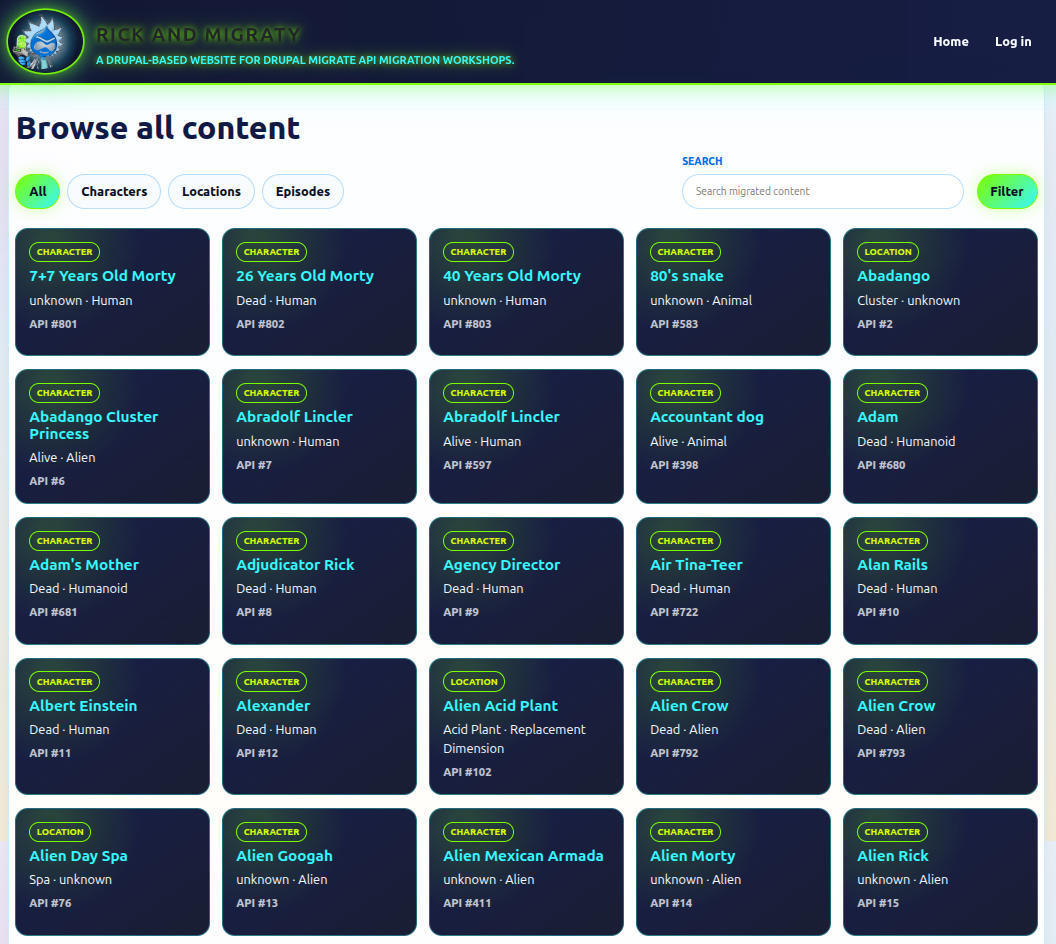 Complete list of items with filtering and searching box
For a character page, the useful questions are immediate:
- Who is this character?
- What is their status, species and gender?
- Where are they from?
- Where were they last seen?
- Which episodes include them?
- What extra context did Fandom provide?
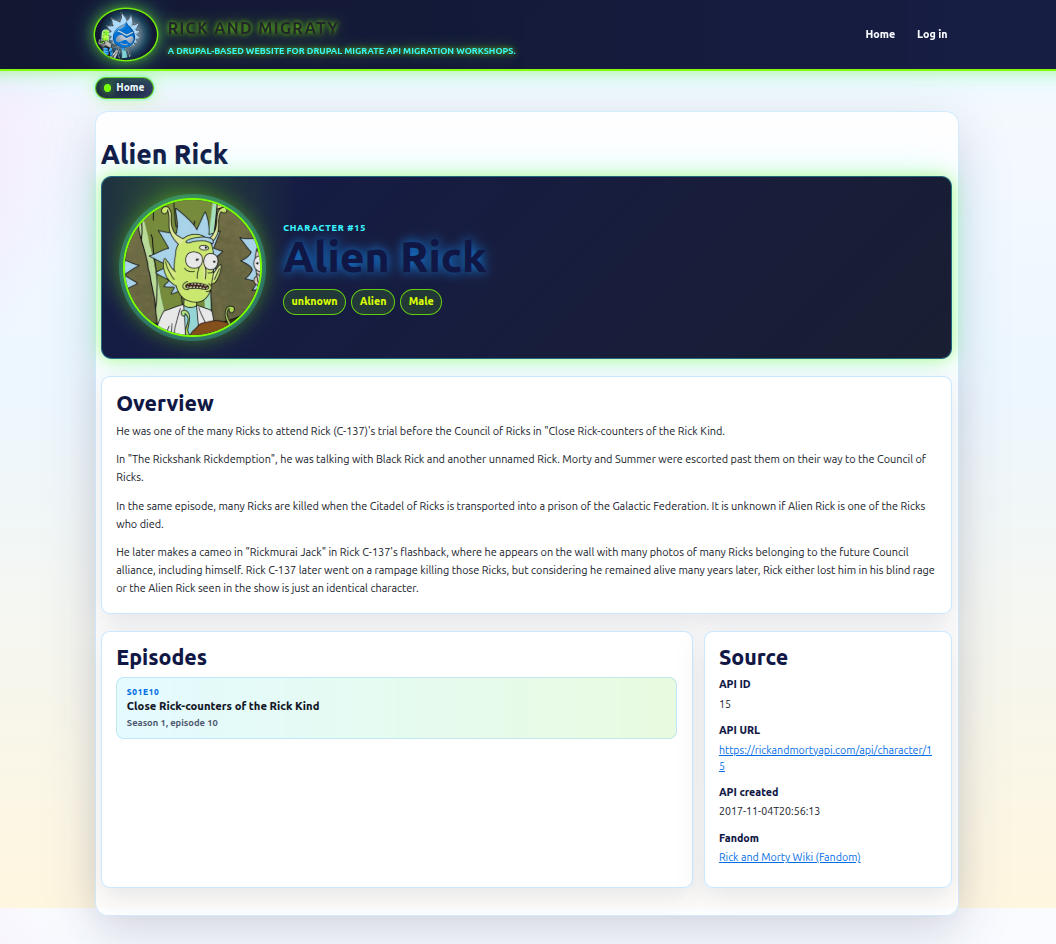 Example for character - Alien Rick
For a location page, the questions change:
- What kind of place is this?
- Which dimension does it belong to?
- Which characters are residents?
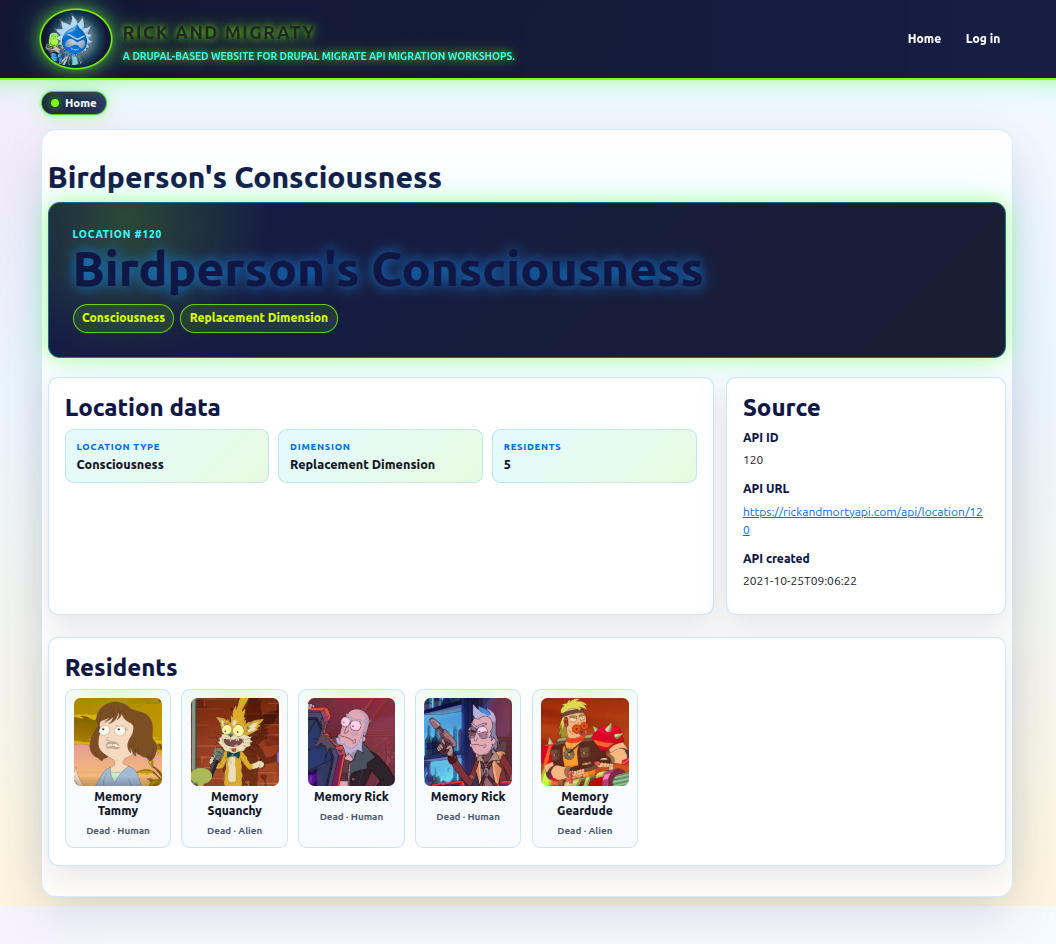 Example for location: the memories of Birdperson
And for an episode page:
- Which season and episode number is it?
- When did it air?
- What rating did TVmaze provide?
- Which characters appear in it?
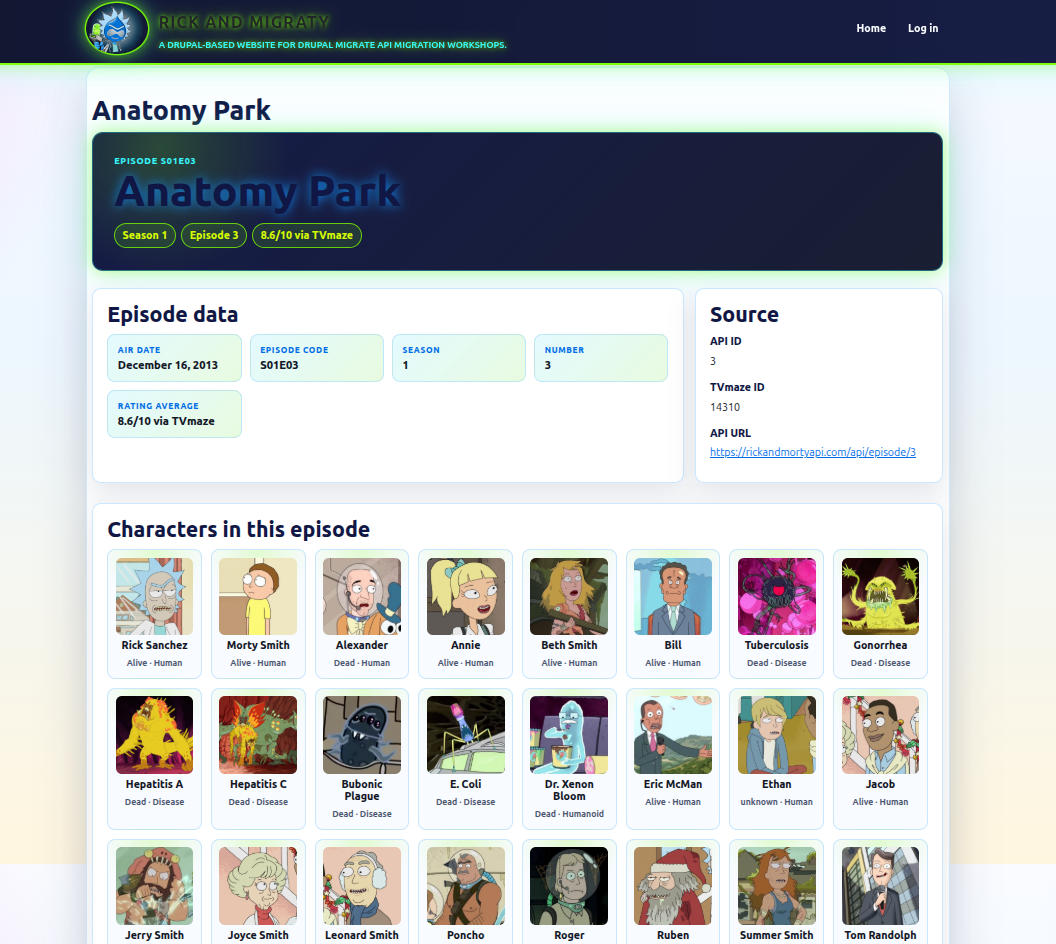 View of an episode page: The Anatomy Park
The same data can also become Views: characters by dimension, episodes by season, locations with many residents, or a small browser for characters by status. This is where the migration stops being a backend exercise and becomes a content product.
The theme templates show that idea in practice:
rick-and-migraty-character.html.twigrenders profile badges, the avatar, Fandom overview text, episode links and source metadata.rick-and-migraty-location.html.twigrenders location metadata, residents and Fandom context.rick-and-migraty-episode.html.twigrenders season/episode data, TVmaze rating badges and character appearances.
That means the migration is not only filling fields. It is feeding a browsing
experience. The fields chosen in the destination model become the variables the
theme can use: avatar_url, episode_links, resident_cards,
appearance_cards, fandom.description, profile.api_url, and so on.
The project also includes a browsing route:
rick_and_migraty_migrate.browse:
  path: '/browse-all-content'
  defaults:
    _controller: '\Drupal\rick_and_migraty_migrate\Controller\BrowseContentController::browse'
    _title: 'Browse all content'
  requirements:
    _access: 'TRUE'
That controller, implemented in
BrowseContentController.php,
does two interesting things for this article. First, it provides a searchable
matrix of imported entities through /browse-all-content. Second, it exposes
browser-visible migration steps and status endpoints so the project can show the
import process as an operation, not just as a terminal command.
It also explains why flattening everything into text fields would have been a poor shortcut. The interesting part of the dataset is the graph. Characters link to episodes, episodes link back to characters, locations list residents, and enrichment fields add context without stealing identity from the canonical source.
10. The migration as an operation (running)
Implementation is one half of a migration. Operation is the other half.
This is especially true when the migration touches several remote services, downloads files, enriches entities in later passes, and needs to be run again and again during development. At that point, the project needs more than YAML definitions. It needs repeatable entry points.
This project now supports several ways to run the process, each with a different purpose:
| Entry point | Best use |
|---|---|
scripts/rick-and-migraty-migrate.sh | Repeatable local runs, especially with fixtures. |
ddev drush ramt:migrate:* | Developer operations: reset, import, avatar batches. |
| Browser modal | A visual control panel for running and observing the migration step by step. |
The shell script lives at
scripts/rick-and-migraty-migrate.sh.
It is the highest-level local runner: it rebuilds caches, optionally resets
previous imported content, chooses fixtures or live API calls, imports base
content, generates aliases, runs Fandom enrichment and prints validation counts.
For a local run based on existing fixtures:
scripts/rick-and-migraty-migrate.sh --fixtures
If fixtures need to be generated first:
scripts/rick-and-migraty-migrate.sh --build-fixtures
Fixtures live under:
.ddev/.tmp-fixtures/rick-and-migraty-api
They let the canonical Rick and Morty JSON rows come from stable local files instead of the public API. That is very useful because it separates two problems that otherwise get mixed together:
- Is the migration code broken?
- Or is a remote service slow, throttling, unavailable or changing?
For faster structural checks, expensive phases can be skipped:
scripts/rick-and-migraty-migrate.sh --fixtures --no-avatars --no-fandom
The normal Drush cycle is intentionally short:
ddev drush ramt:migrate:reset
ddev drush ramt:migrate:import
Those commands are implemented in
RickAndMigratyMigrateCommands.php.
The import helper follows the same order we designed earlier: locations,
episodes, avatars, characters, episode relationship update, and location
relationship update.
The reset command is important. It cleans imported entities, avatar file
entities, physical avatar files, aliases and Migrate API map/message rows. That
last part matters because deleting imported entities from the UI does not clear
Migrate API bookkeeping. Drupal can look empty while migrate:status still
believes the rows are already imported.
That cleanup is delegated to
MigrationResetter.php,
which makes the reset operation explicit: delete custom entities, remove avatar
file entities and physical files, delete /rick-and-migraty/% aliases, truncate
migrate_map_* and migrate_message_* tables, and invalidate caches.
Avatar downloads are handled as their own operation:
ddev drush ramt:migrate:avatars --batch-size=10 --sleep=12 --retries=3
That command shape tells the truth about the work. Downloading hundreds of
remote files is not the same kind of operation as mapping JSON fields. It needs
batching, retries and pauses. The helper imports avatars with --idlist
ranges, adds a local request delay, and retries failed batches before giving up.
That separation gives us a practical recovery path: if avatar downloads fail halfway through, we can retry the file phase without pretending the whole migration model is broken.
Rate limits are part of the migration design
During development, the project also ran into a very concrete reminder that
remote APIs are not infinite: 429 Too Many Requests responses. That kind of
error is easy to treat as an annoyance, but in a migration it is actually useful
feedback. It tells us that the import process is asking too much and too quickly,
or too repeatedly from a service we do not control.
The response was not to hide the error. The response was to turn rate limiting into a design constraint:
- Source responses are cached by URL, so repeated local runs do not keep asking for the same pages
- Fixtures can replace remote API calls when the goal is to test mapping logic
RICK_AND_MIGRATY_API_MAX_PAGEScan limit smoke tests to a small subsetrequest_delay_mscan slow down uncached API requests- Avatar downloads run in batches with
--sleepand--retries - Avatar imports use
--idlistranges, so a failed batch can be retried without replaying the whole migration
This is why the avatar phase is deliberately sequenced instead of being hidden inside the character import. Remote file downloads are the most aggressive part of the pipeline: hundreds of HTTP requests, binary transfers, local file entities, filesystem writes and retry behavior. Keeping that work separate makes the migration more polite and much easier to recover.
In other words, 429 code was not only an error code. It was a design review from the
remote API.
The browser is a control panel
The browser flow is useful, but it should not pretend to be the migration engine.
The first version tried to run too much work in one long request. That is fragile because PHP-FPM, nginx, proxies and browsers all have opinions about long-running HTTP requests, and none of those opinions are sentimental. 😉
The current flow uses smaller POST steps:
/rick-and-migraty/run-migration-step/{step}
The route is declared in
rick_and_migraty_migrate.routing.yml
and handled by
BrowseContentController.php.
This is the modal window:
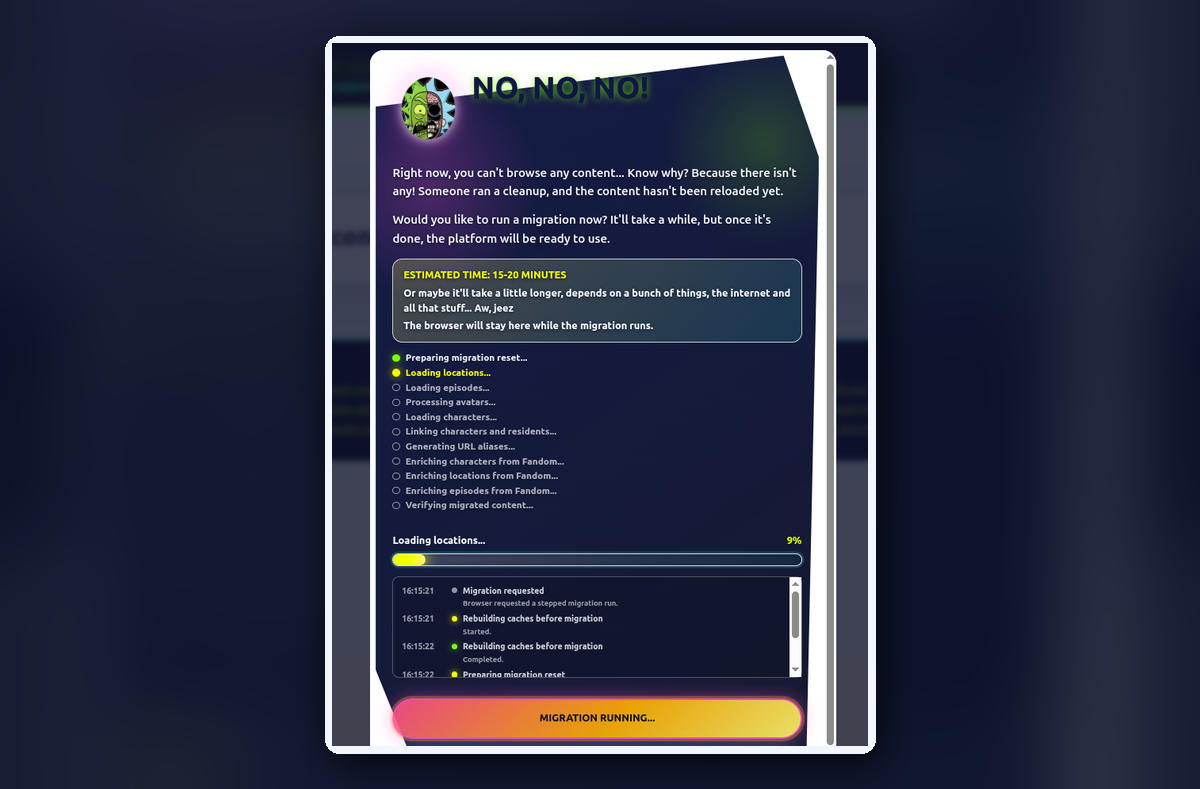 Modal window showing progress and some trace from migration
The modal shows progress, recent trace entries and a final summary. The same
trace is written to watchdog through the rick_and_migraty_migrate logger
channel, so a symptom seen in the browser can be investigated from Drush:
ddev drush watchdog:show --type=rick_and_migraty_migrate --count=50
Avatar work is split internally into ranges such as avatars-1, avatars-2
and so on. The user sees one “Processing avatars” phase, but the backend gets
smaller units of work that can fail, log and recover more clearly.
That distinction is important: the browser is not a replacement for Drush. It is a guided control panel over the same operational steps, useful for observing the pipeline and for making the migration experience visible.
11. Losing your mind (debugging)
When a migration fails, the tempting move is to stare at the YAML until it confesses. Sometimes that works. Often, it just makes the YAML nervous. 😬
A better routine is to debug from the outside in.
- First, inspect the source:
curl -s 'https://rickandmortyapi.com/api/character' | jq '.info'
curl -s 'https://rickandmortyapi.com/api/character' | jq '.results[0]'
curl -s 'https://rickandmortyapi.com/api/location' | jq '.results[0].residents'
curl -s 'https://rickandmortyapi.com/api/episode' | jq '.results[0].characters'
curl -s 'https://api.tvmaze.com/shows/216/episodes' | jq '.[0] | {id, name, season, number, rating}'
The goal here is not to debug Drupal yet. The goal is to answer a simpler question first: does the source still look like the migration expects? If the remote shape changed, or if an endpoint is slow or unavailable, the YAML is not the first suspect.
- Then inspect the migration state:
ddev drush migrate:status
ddev drush migrate:messages rick_and_migraty_location
ddev drush migrate:messages rick_and_migraty_episode
ddev drush migrate:messages rick_and_migraty_character
migrate:status tells us what Drupal thinks has been imported. The message
tables tell us which rows failed and why. This is where the earlier reset
discussion matters: Migrate API state is not the same thing as visible
content.
If the issue is a missing reverse relationship after a partial run, retry the update passes directly:
ddev drush migrate:import rick_and_migraty_episode --update
ddev drush migrate:import rick_and_migraty_location --update
Those commands are narrow on purpose. They do not re-download avatars, rebuild fixtures or re-import the full graph. They only ask the already-defined episode and location migrations to complete relationships that now have resolvable character targets.
If the problem is Fandom enrichment, debug that phase without rerunning the base imports:
ddev drush migrate:messages rick_and_migraty_character_fandom
ddev drush migrate:messages rick_and_migraty_location_fandom
ddev drush migrate:messages rick_and_migraty_episode_fandom
and retry only the enrichment migrations:
ddev drush migrate:import rick_and_migraty_character_fandom --update --feedback=50
ddev drush migrate:import rick_and_migraty_location_fandom --update --feedback=25
ddev drush migrate:import rick_and_migraty_episode_fandom --update --feedback=25
This is another reason the enrichment phase runs separately. A Fandom parsing problem should not force us to re-import all canonical content. The base graph and the editorial enrichment are different debugging surfaces.
When a row still refuses to behave, the checklist is familiar:
- Check YAML indentation
- Inspect source selectors
- Inspect
migrate_map_*tables - Inspect
migrate_message_*tables - Confirm that dependencies ran in the expected order
- Use Xdebug in DDEV when a custom process plugin becomes suspicious
For this project, I would add a few extra checks:
- Confirm
RICK_AND_MIGRATY_API_FIXTURE_BASE_PATHwhen using fixtures - Confirm
RICK_AND_MIGRATY_API_MAX_PAGESis not limiting a run unexpectedly - Inspect watchdog entries for
rick_and_migraty_migrate - Check whether the failed row belongs to the base import, avatar download, relationship backfill or Fandom enrichment.
The boring places are usually where the useful clues live: a selector, a map table, a missing dependency, an empty string, or a value that looked like an integer until it met real source data.
12. Things worth highlighting (deciding)
This project has a handful of decisions that should stay documented because they shape the implementation more than any individual YAML file. If someone returns to the project later, these are the decisions I would want them to see before touching the migrations.
First, circular relationships are expected. Characters point to locations and episodes, while locations and episodes point back to characters. The migration does not try to solve that in a single heroic pass. It imports the base graph first, then completes reverse references with update passes.
Second, pagination is part of the source contract. If a migration only imports the first API page, it is not a migration. It is a demo that got tired. The source plugin owns pagination because every canonical resource needs the same behavior, and because the YAML should not care how many pages the remote API has today.
Third, external IDs are not optional. The source
idis stored asapi_idand used consistently as the stable bridge between remote records, map tables, fixtures, updates and debugging. Drupal entity IDs are local implementation details; the API ID is the identity we can explain.Fourth, images deserve their own phase. Character avatars are downloaded through a separate migration and can be processed in batches. The entity still preserves the remote
image_url, but local file handling is operationally different from field mapping and should be treated that way.Fifth, public APIs should be treated politely. Caching, fixtures, page limits and request delays are not decorative settings. The
429 Too Many Requestsresponses we saw during development made that very clear: politeness is not only etiquette, it is part of making the migration repeatable.Finally, enrichment sources are not canonical sources. TVmaze contributes ratings. Fandom contributes descriptions. Neither of them gets to redefine the base Rick and Morty dataset.
That list is not just documentation. It is also a design guardrail. When the project grows, every new migration should be checked against those decisions:
- Does it preserve source authority?
- Does it keep relationships explicit?
- Does it remain repeatable?
- Does it avoid turning remote services into a development tax?
13. What I learned (reflecting)
If I had to extract a few reusable principles from the Rick and Migraty experience, they would be these.
Build a source profile before writing too much YAML. Know the pages, fields, empty values, relationship shapes and awkward cases before deciding that the Drupal model is obvious. A source profile does not need to be formal, but it should answer practical questions: where are IDs, where are relationships, where are dates, where are files, where are empty values, and which fields are only display labels.
Preserve the graph when the graph is the value. In this project, characters, locations and episodes are not just three lists. Their relationships are the interesting part, so the destination model should make those relationships queryable. If the destination model flattens the graph into text, the migration may succeed technically while losing the point of the dataset.
Keep transformations narrow. One plugin extracts IDs from URLs. One plugin extracts season or episode number. One source plugin owns pagination. Small pieces are easier to explain, test and replace. They also make the YAML more readable because each custom plugin name carries meaning.
Sequence imports deliberately. Locations and episodes need to exist before characters can reference them. Characters need to exist before reverse relationships can be completed. That order is not an implementation detail; it is part of the model. If the order feels awkward, the relationship graph is probably trying to tell us something.
Treat operations as part of the design. Resets, fixtures, avatar batches, update passes and browser traces are not nice extras. They are what make the migration usable after the first successful import.
And perhaps most importantly: do not let secondary data sources blur the contract. A migration can merge data from several places without becoming vague about which source owns which truth. In this case, Rick and Morty API owns the canonical graph, TVmaze enriches episode ratings, and Fandom enriches narrative context.
That is the part I would reuse in another project even if the subject matter were completely different. The names would change, the APIs would change, the fields would change, but the pattern would remain:
- Choose the canonical source
- Model the graph
- Isolate enrichments
- Make reruns boring.
14. Next steps (planning)
This project brought together pagination, relationships, enrichment, avatars, fixtures and repeatable execution in a working Drupal migration. The next steps build on that implementation:
- Keep the article and MkDocs documentation aligned with the code as the project evolves, updating examples and screenshots when behavior changes.
- Explore avatar migration in a follow-up article, because remote file handling, batching and recovery deserve a closer look.
- Review the coverage of the canonical dataset and decide how to handle missing episodes and characters while preserving stable external IDs and explicit source responsibilities.
There is also a possible follow-up article hiding in plain sight: the browser control panel. It connects migration execution, trace state, status polling, Drush commands and user-facing feedback. That is not strictly part of the Migrate API, but it is very much part of making a migration usable by humans.
For now, though, the important thing is that the design is visible. We have a canonical source, a destination model, a phased import order, custom plugins for repeated problems, enrichment passes, operational helpers and a debugging routine. That is enough for this sixth stop in the migration series.
Trying to put every implementation detail into this post would turn it into a manual. The useful version is narrower: enough code to make the design concrete, enough explanation to understand the tradeoffs, and enough operational detail to avoid pretending that migrations end when the YAML validates.
Documentation note: The structure and intent of this article follow the documentation principles described by Diátaxis, using the distinction between tutorials, how-to guides, explanations and reference material to keep practical instructions and conceptual context in their proper place.
Language note: AI assistance was used for grammatical review and for polishing English expressions. The technical decisions, implementation details and project experience described here remain my own.
Comments
Comments are provided by Disqus. They are loaded only if you allow the comments category in your cookie preferences.